
On this page
- The short answer
- Should a dental practice use an AI chatbot at all?
- Where the front desk ends and the surgery begins
- Five lanes for a dental front desk
- Make the refusals real, not aspirational
- The buying-intent score is not a triage score
- Where a patient's message actually goes
- Patients under 18
- What booking can and cannot do
- Website chat, WhatsApp or the telephone?
- Which plan fits a dental practice?
- What to settle before you switch it on
- Who should choose it, and who should not
It is 10.34pm. Someone has been meaning to sort out a check-up for months, has finally opened your website, and wants to know three things: are you taking new patients, what does a first visit cost, and can they come on Thursday.
Reception closed at five. The practice is dark. By morning that person may have asked the same three questions of two other clinics.
The enquiry arrives whether or not anyone is there to take it. Answering it is a front-desk job; almost everything it turns into afterwards is not. That is the real case for an AI chatbot in a dental practice, and it is a narrow one: answer the administrative questions the front desk answers all day, take a name and a number, and offer a consultation time. It is not to work out what is wrong with someone's tooth, decide whether it can wait until Monday, price a crown from a description, or collect a medical history into a chat box at half past ten at night.
The short answer
Inboxxit is worth considering when a dental practice is losing new-patient enquiries to an unattended website, and wants them answered, recorded and owned. The $39 entry plan covers the website widget, lead capture, buying-intent scoring and the CRM. Growth adds in-chat booking, Google and Outlook calendar connection, a knowledge base, voice notes, follow-up and conversion reporting, and is where WhatsApp sits. Inboxxit is an administrative front desk. It is not a clinician, a triage system, a telephone-answering service, or a practice-management system.
Inboxxit is our product, so this is a product-fit guide rather than a neutral roundup. For dental practices there are more places than usual where the honest answer is "not this" — and the privacy section below is the most important part of this article, which is why it comes before the pricing rather than after it.
Should a dental practice use an AI chatbot at all?
Yes, when new-patient enquiries arrive through the website and go unanswered or unrecorded. The fit is strongest when the practice gets real website traffic from search, ads or referrals; has a front desk that cannot answer everything while patients are being seen; can write down its hours, location, services, appointment process and published consultation fee; wants each enquiry to become a visible record with an owner rather than a note on a pad; and is prepared to keep every clinical judgment with a clinician.
It is a weaker first purchase when most new patients arrive by telephone, when the practice needs its patient-management system to be the single source of truth for scheduling, or when the real requirement is forms, recalls, insurance and payments integrated with patient records. Those are different products, and a dental practice-management or patient-engagement platform is the right place to look.
It is also worth being clear about what "AI receptionist for dentists" means when you see it advertised. Sometimes it is a website widget. Sometimes it is a voice agent that answers the practice telephone. Sometimes it is a module inside a patient-engagement platform. Inboxxit is the first of those, plus WhatsApp on Growth. It does not answer your telephone line.
Where the front desk ends and the surgery begins
Every other decision in this article follows from one: how far into the practice the chatbot is allowed to walk.
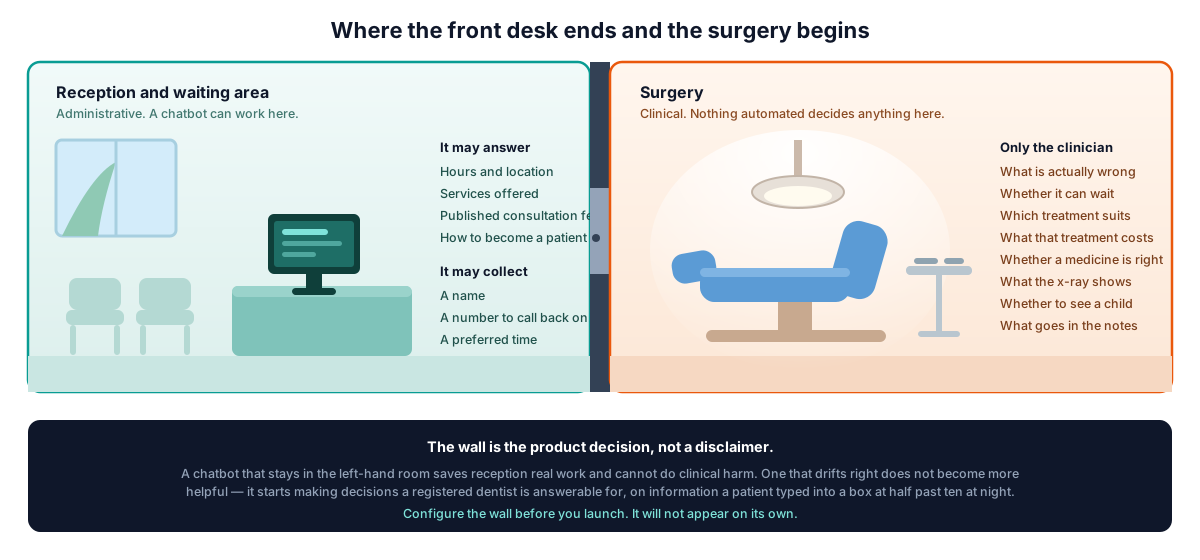
In the left-hand room the chatbot is genuinely useful and carries almost no clinical risk. It states hours and location, lists services offered, gives the published consultation fee, explains how to become a patient, takes a name and a number, and offers a time.
In the right-hand room it has no business at all. What is wrong, whether it can wait, which treatment suits, what that treatment will cost, whether a medicine is appropriate, what the radiograph shows, whether to see a child, what goes in the notes — every one of those belongs to a registered dentist. In Jamaica that registration is not a formality: the Dental Council of Jamaica is the statutory body constituted under the Dental Act of 1972, and one of its stated functions is "to ensure the maintenance of proper standards of professional conduct by persons registered as dentists or enrolled as dental auxiliaries". A chat widget is not registered with anybody. The dentist whose name is on the door is the one who answers for what the practice tells a patient.
Five lanes for a dental front desk
Before loading the chatbot with every question on your website, decide which lane each enquiry belongs in. This is the map that tells you what to configure, what to test, and where a person must take over.
| Enquiry lane | The chatbot may | It should not |
|---|---|---|
| Routine administration | State hours, location, parking, languages, services offered, the published consultation fee and how the appointment process works | Improvise a policy, a fee or an availability promise that is not in the practice's own information |
| New-patient capture | Take a name, a contact number, a preferred time and a broad service interest such as "check-up" or "whitening" | Ask for symptoms, medical history, medicines or anything else it does not need to arrange a callback |
| Booking | Offer and confirm an approved consultation or assessment slot against real calendar availability, on Growth | Promise a specific dentist, chair, room, treatment length or same-day emergency slot the calendar knows nothing about |
| Urgent or in pain | Send the practice's own reviewed wording, capture only a name and number, and alert a person immediately | Assess how serious it is, decide whether it can wait, or continue the booking flow as if nothing was said |
| Clinical or sensitive | Decline plainly and route to a person | Answer, invite, or store it — unless the practice has separately settled the legal, consent and retention position for that exact workflow |
Written down like that, the fifth lane stops looking like a limitation and starts looking like the point. A front desk that refuses cleanly is doing its job.
Make the refusals real, not aspirational
Inboxxit ships a standing set of guardrails in the assistant's own instructions, on every plan: never invent or guess a price that is not on file; never invent an address, telephone number, date or policy; never invent a discount or offer; do not give a medical diagnosis, suggest medication, or write step-by-step technical instructions; avoid the words "guarantee", "always" and "100%"; and never tell someone a booking is confirmed unless a booking actually went through on that turn.
Those are controls, not certainties. They are instructions given to a language model, and Inboxxit's own terms of service state that AI output can be inaccurate and is not a substitute for human judgment. For a dental practice they are also generic — they say nothing about swelling, or an avulsed tooth, or whether a crown is suitable. That part you write.
The consultation rules screen is where it goes. A rule takes a keyword trigger, an action of Immediate Handoff, and a reply that is sent word for word when the rule fires — the field's own note says that with Handoff, the text you write "is what the customer sees while they wait". So the sentence the patient reads is the practice's sentence, approved in advance by someone qualified to approve it.
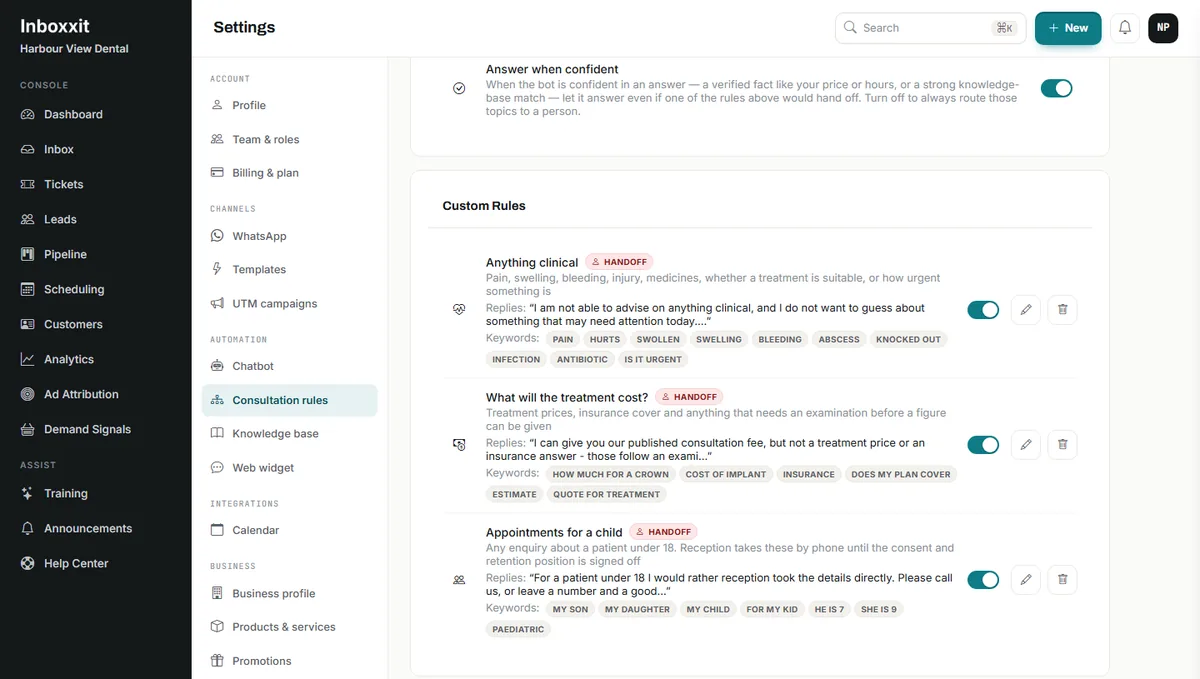
Three rules cover most of it. One for anything clinical — pain, swelling, bleeding, injury, infection, medicines, "is this urgent" — which stops the conversation, sends the approved wording and alerts a person. One for treatment prices and insurance, which gives the published consultation fee and defers everything else to the examination. One for patients under 18, which we come back to below.
Two nearby settings deserve a decision rather than a default. Answer when confident, on by default, lets a confident answer to a verified fact go out even where one of the four built-in rule categories would otherwise hand off. And the Confidence Matrix in chatbot settings lists four categories the assistant may answer without human review — business hours and location, service-area checks, initial pricing estimates, appointment scheduling — all of which arrive switched off. Turn them on one at a time, and after each one, send the exact phrases your clinical rules are meant to catch and confirm they still hand off.
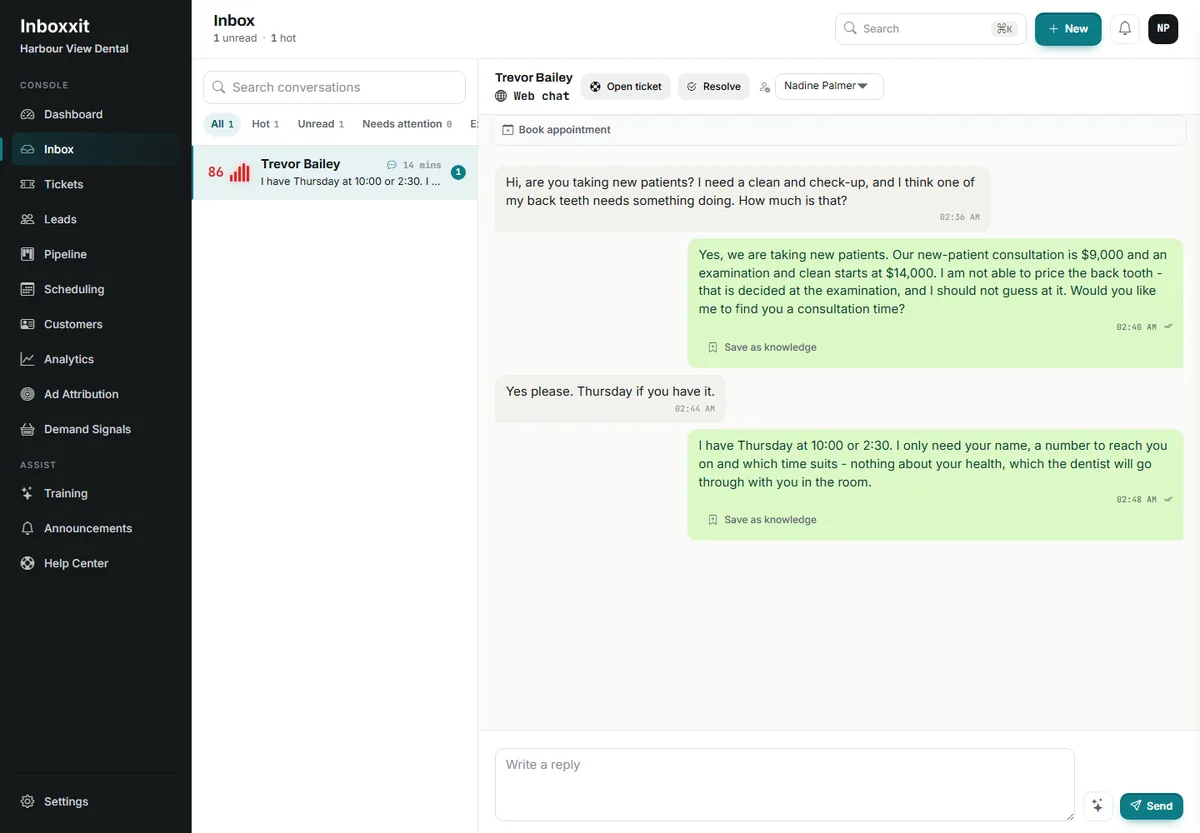
Notice what that last message does not do. It does not ask which tooth, how long it has hurt, or whether it is sensitive to cold. Those questions would feel helpful and would be a mistake, for the reason in the next section.
The buying-intent score is not a triage score
Inboxxit scores every lead from 0 to 100 for buying intent, and for a dental practice that is genuinely useful: it tells you who to call back first among people who all want a check-up.
It says nothing whatsoever about clinical priority. A patient comparing whitening prices can score in the nineties. Someone with a serious problem who typed two flat sentences and did not ask about money can score low. If a practice ever lets that number order clinical attention, it has built a triage system out of a sales signal, and the number will be wrong in exactly the cases where being wrong matters.
Keep the two apart deliberately. The score orders the follow-up queue. A handoff rule handles anything that sounds clinical, immediately, regardless of score.
Where a patient's message actually goes
This is the section most dental chatbot articles skip, and it is the one that should decide the purchase.
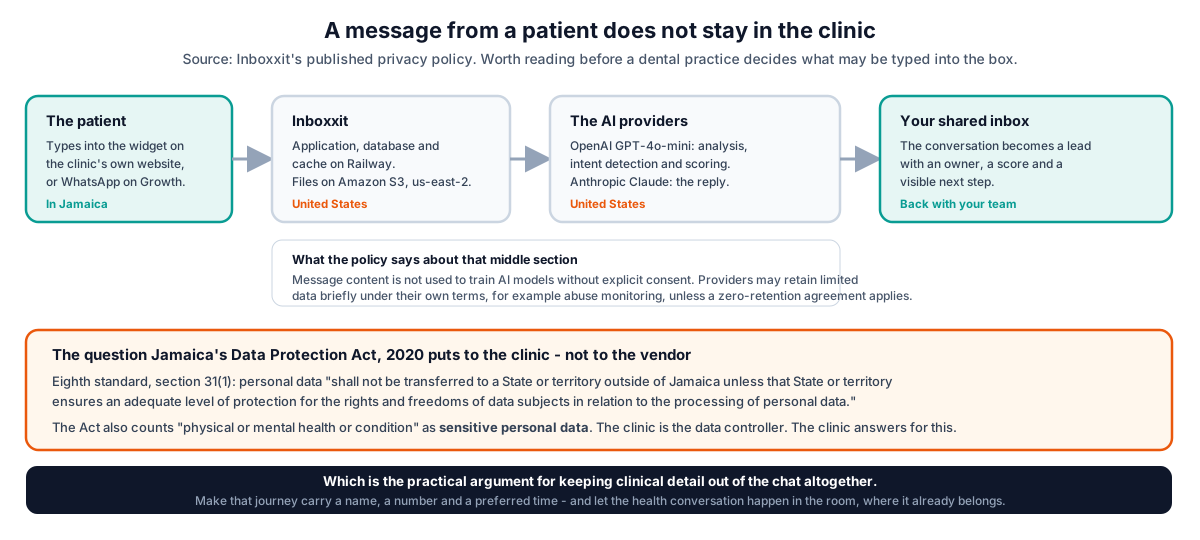
Inboxxit's privacy policy is explicit about the route. The application, database and cache run on Railway in the United States; files sit on Amazon S3 in us-east-2. Message content is processed by OpenAI's GPT-4o-mini for analysis, intent detection and scoring, and by Anthropic's Claude for replies and smart replies. The policy states that message content is not used to train AI models without explicit consent, and that providers may retain limited data for a short period under their own terms — abuse monitoring, for example — unless a zero-retention agreement is in place.
Under Jamaica's Data Protection Act, 2020, that route is the practice's responsibility, not the vendor's. The eighth data protection standard, section 31(1), is direct: personal data "shall not be transferred to a State or territory outside of Jamaica unless that State or territory ensures an adequate level of protection for the rights and freedoms of data subjects in relation to the processing of personal data." The Act also lists "physical or mental health or condition" among the categories of sensitive personal data, and it prohibits processing without registration — data controllers register with the Office of the Information Commissioner, which is also where a security breach has to be reported without undue delay under the seventh standard.
There is a second, blunter limit in Inboxxit's own policy. For WhatsApp, it says you agree not to use the service to collect, store or transmit payment card numbers, government-issued identification numbers, financial account credentials, "protected health information (PHI) as defined by HIPAA or equivalent regulations", biometric data, or information about minors under 13. That is a contractual restriction on the practice, and it applies whatever jurisdiction you are in.
The policy also notes that the service includes content filters to detect prohibited data, "but you remain responsible for compliance". Take that second clause seriously. The filter that exists is narrow: it matches card-number, national-identifier and CVV patterns on outbound WhatsApp messages, plus a short list of prohibited business terms. It does not detect a patient describing symptoms, and it does not run on what a patient sends you. If clinical detail is going to be kept out of the conversation, the practice's own configuration is the thing keeping it out.
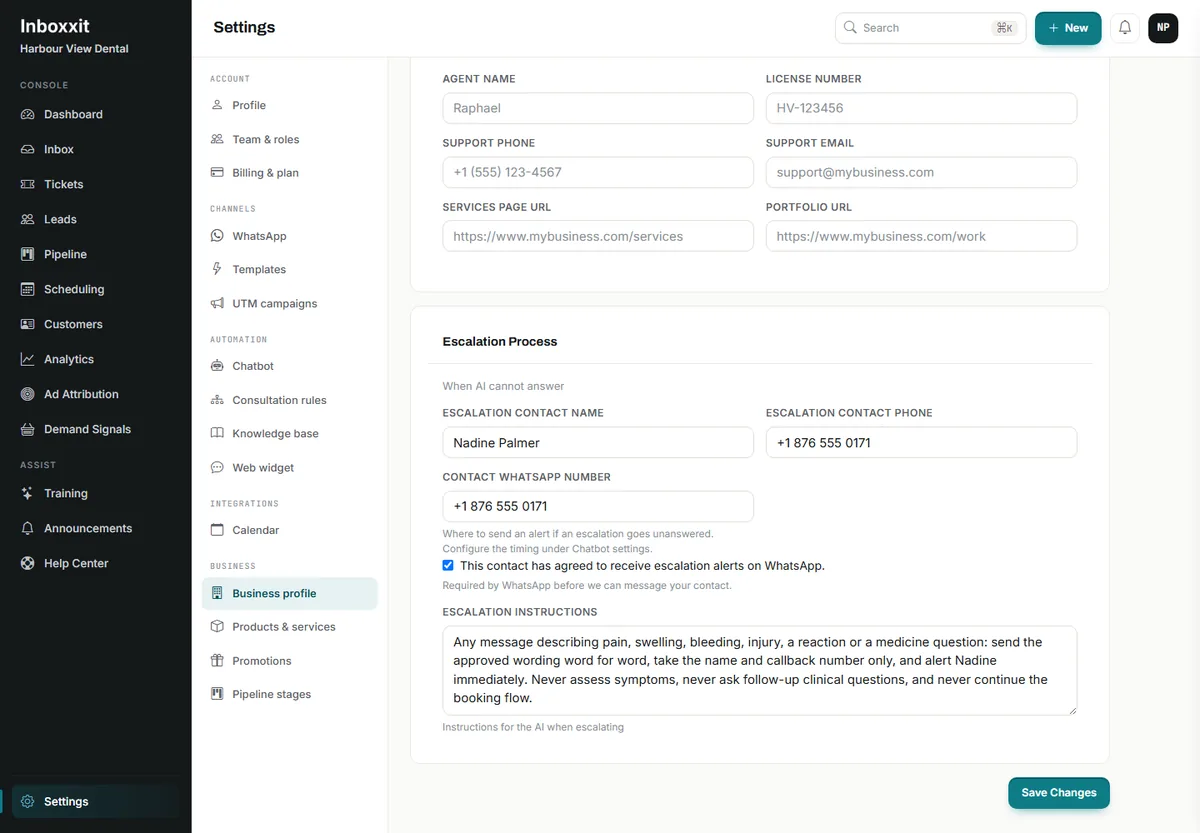
All of which points to one workable position, and it is not a compromise: design the conversation so a patient never needs to disclose anything clinical. Make the message carry a name, a number and a preferred time. Let the health conversation happen in the room. That is simultaneously the safest reading of the Act, the cleanest fit with the vendor's own restrictions, and — as it happens — a better patient experience than a chat box asking about someone's gums.
None of this is legal advice, and a practice should take its own. But it is the shape of the assessment, and any vendor who tells a Caribbean dental practice not to worry about it is selling harder than they are thinking.
Patients under 18
A general dental practice sees children. The current public policy position does not accommodate that, and it is better to say so plainly than to let a practice discover it later.
Inboxxit's privacy policy states that "the Service is not intended for individuals under 18 years of age" and that it does not knowingly collect personal information from children. Separately, the WhatsApp restrictions prohibit information about minors under 13. So until a practice has settled consent, retention and the product's position for that specific workflow, a paediatric enquiry should not be handled in the chat at all.
That is easy to implement and worth doing on day one: a keyword rule on "my son", "my daughter", "my child", "paediatric" and similar, action Immediate Handoff, with wording that asks the parent to call reception. Reception takes the details the way it always did. Nobody loses the appointment, and nothing about a child ends up in a system whose own terms say it was not built for them.
What booking can and cannot do
On Growth and above, the chatbot can offer real availability and create the appointment once the patient confirms, using the internal calendar or a connected Google or Outlook calendar. Reminders, rescheduling and a waitlist all exist.
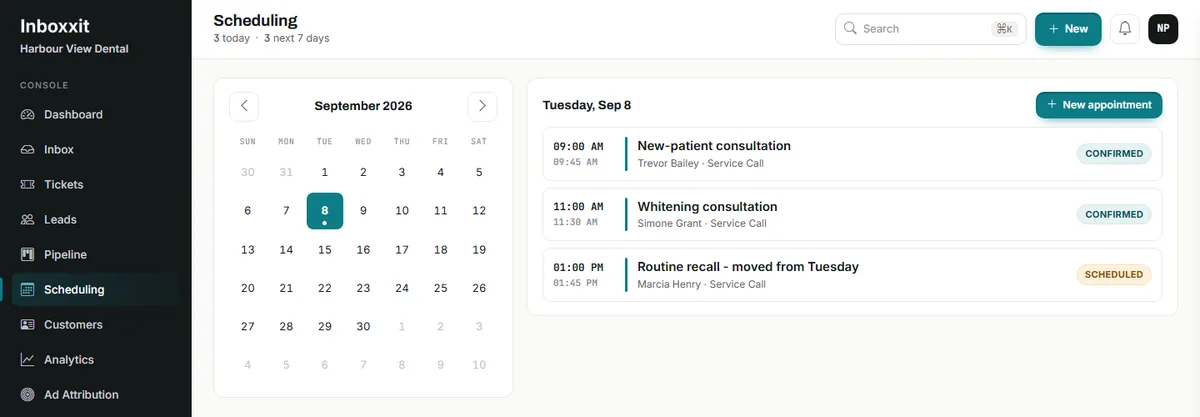
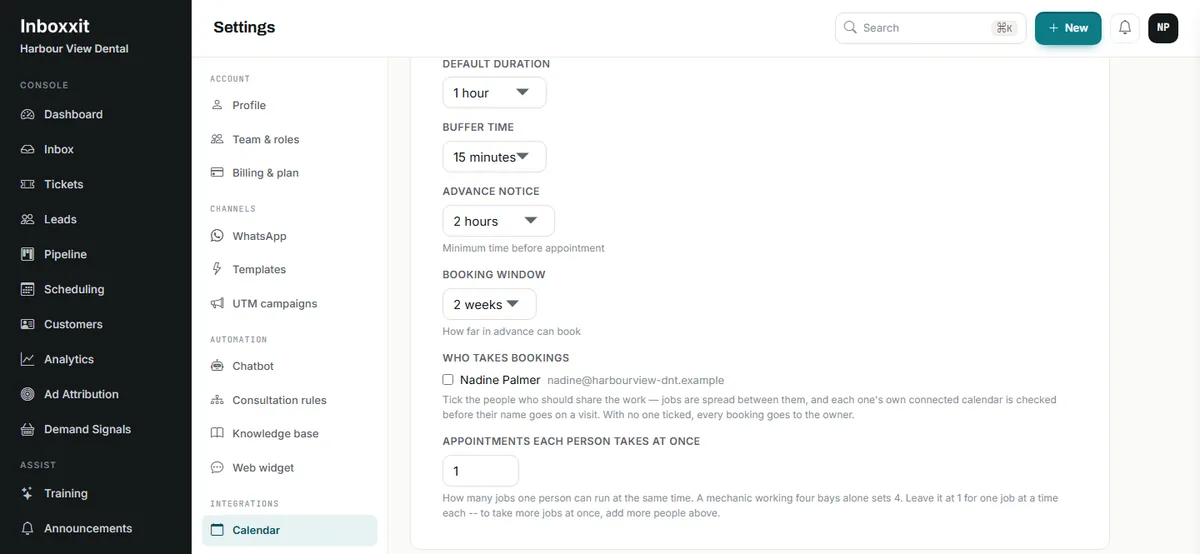
Two things are commonly misread. The first is capacity. The control is "Appointments each person takes at once" — it is per person, not per slot, and it accepts one to twenty. It also does assign: work is spread between the people ticked under "Who takes bookings", and each one's own connected calendar is checked before their name goes on a visit. With nobody ticked, every booking goes to the owner.
The second is what it is not modelling. It has no concept of a surgery, a chair, an operatory or a hygienist's room; no procedure-specific durations across shared resources; no insurance verification; and no write-back to a patient record. If your Tuesday depends on which chair is free and how long a particular procedure runs in it, the practice-management system stays in charge of the schedule and the chatbot books consultations into a defined, protected slot type.
That is the safe first configuration: new-patient consultations, assessments and callbacks. Treatment appointments follow the examination, which is where they belonged anyway.
Website chat, WhatsApp or the telephone?
Choose the channel before choosing the product.
| Where the enquiry arrives | What fits | What to check first |
|---|---|---|
| Website visitors who leave without contacting you | The $39 Website Chatbot plan: approved answers, lead capture, intent scoring, shared inbox and pipeline | No booking, no WhatsApp, no voice notes, no knowledge-base upload and no conversion reporting on the entry plan |
| Patients who message the practice's WhatsApp number | WhatsApp, from Growth, using the practice's own WhatsApp Business number through Meta's official route | Setup and Meta approval are required, an approved template is needed outside the customer-service window (see Meta's messaging guidance), and the prohibited-data restrictions above apply to this channel specifically |
| Missed telephone calls | A phone-first AI receptionist or a human answering service | Inboxxit does not answer telephone calls. Confirm transfer rules, out-of-hours cover, and whether the product serves your country at all |
| Scheduling, recalls, forms, payments, records | A dental practice-management or patient-engagement platform | Integration with your patient records, and whether website enquiries still need a front layer in front of it |
Practices in the Caribbean should add one more check to any shortlist: whether the vendor actually operates here. Support hours, payment methods and local availability are worth confirming before a demo, not after.
Which plan fits a dental practice?
Prices are in US dollars and were checked against the live pricing page on 8 September 2026.
| Plan | Best dental use | Monthly package |
|---|---|---|
| Website Chatbot | Website questions, new-patient capture, intent scoring, shared inbox and pipeline | $39 founder rate, normally $59. Website only. 500 conversations, 1,000 AI replies, up to 3 team members |
| Growth | Everything above plus in-chat consultation booking, calendar connection, knowledge base, voice notes, follow-up, conversion reporting and WhatsApp | $79, normally $99. 3,000 conversations, 4,000 AI replies, up to 5 team members |
| Professional | Larger practices or groups needing more seats and volume, payment links, API access and advanced analytics | $149, normally $199. 10,000 conversations, 10,000 AI replies, up to 15 team members |
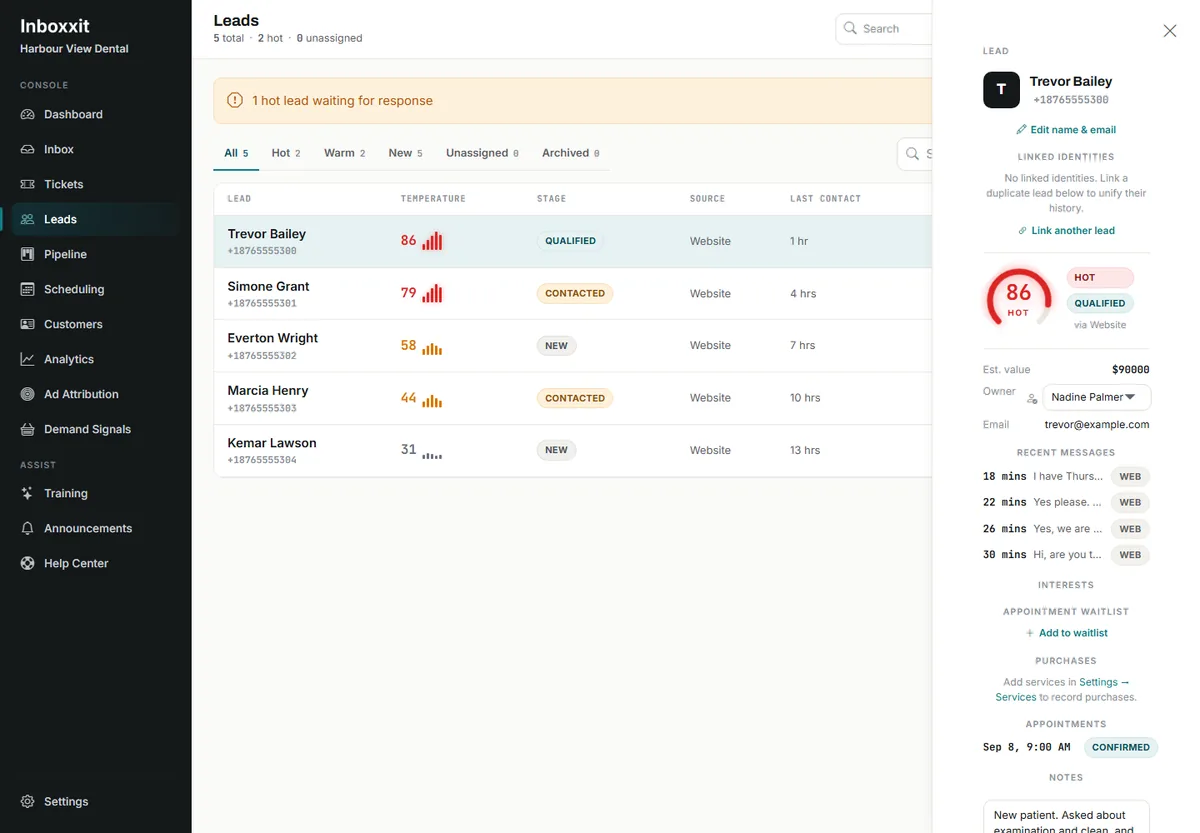
On the entry plan the chatbot cannot be trained on uploaded documents or a website sync; the knowledge base begins at Growth. What it does instead is show you the gaps: when the assistant is not confident, it records the unanswered question for review, and an owner or admin approves the answer from the queue. For a practice writing down its approved answers for the first time, that queue is a better starting point than a document dump, because every entry came from a question a real patient asked.
There is no free trial. Payment is taken at signup and new customers have a 30-day money-back guarantee. Voice notes are included from Growth: 300 a month on Growth, 1,000 on Professional. Appointment reminders are available on every plan — what Growth adds is the chatbot creating the appointment inside the conversation.
What to settle before you switch it on
Write the approved-answer list first: hours, location, parking, languages, services offered and not offered, the published consultation fee, how a new patient is taken on, payment methods, and the cancellation policy. Remove anything out of date. If the team cannot agree the answer, the chatbot should not be giving it yet.
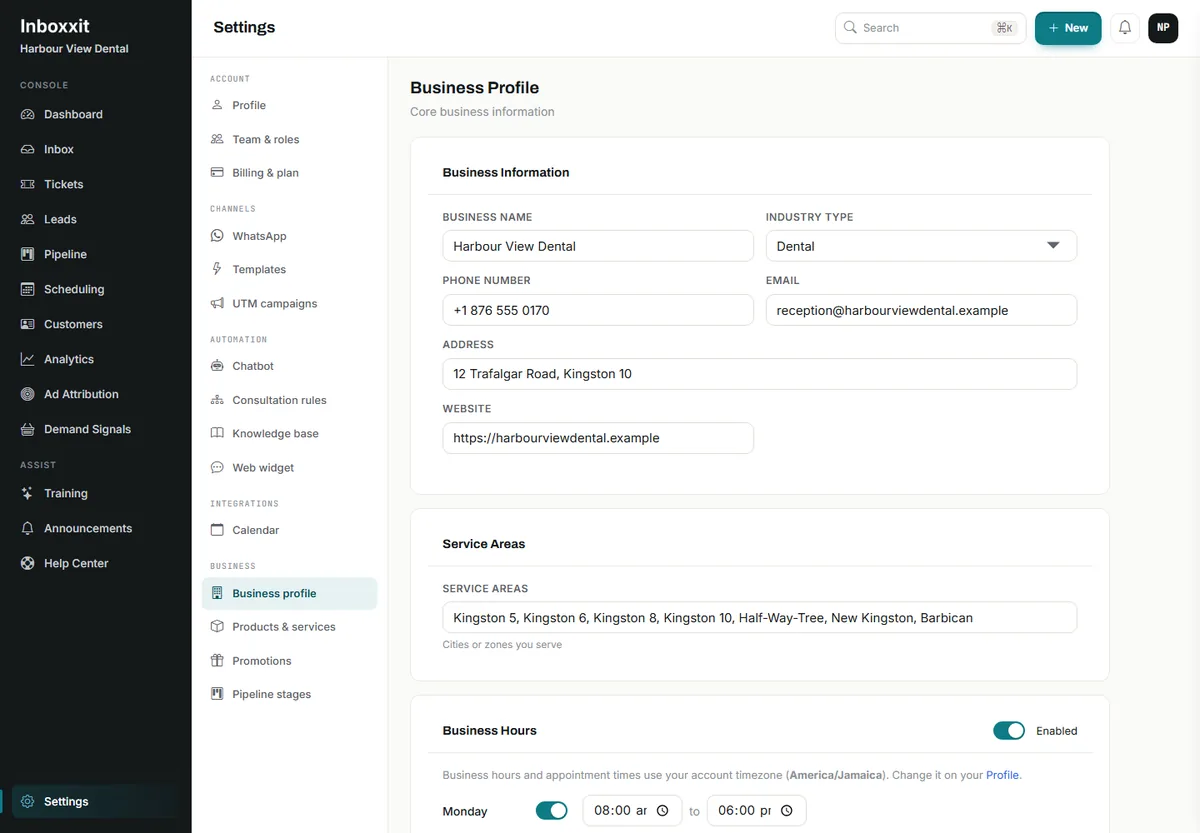
Then write the never-answer list as rules, with wording a clinician has approved. Decide the position on under-18 enquiries. Choose the one appointment type the chatbot may book and protect it in the calendar. Name the person who receives escalations and confirm they have agreed to be contacted that way.
Then test the awkward questions, because the easy ones were never the risk. Ask what a crown costs. Ask whether your insurance covers it. Say a tooth has been aching for three days. Say a filling came out this morning. Say your child needs a check-up. Ask for something the practice does not offer. Ask whether you should take painkillers. Ask if it is an emergency. Every one of those should end with a person, cleanly, using words the practice chose.
Review the first month before expanding: unanswered questions, stale fees, handoff delays, duplicate bookings, and whether the team actually followed up. Fix the information before adding more automation.
Who should choose it, and who should not
Choose Inboxxit when the problem is at the front door: new-patient enquiries arriving through the website while the team is with patients, questions that are always the same, and good enquiries going cold because nobody owned them. Start on the Website Chatbot plan. Move to Growth when consultation booking, WhatsApp, a knowledge base or follow-up solves a problem you can name.
Choose a dental practice-management or patient-engagement platform when the requirement is scheduling against chairs and providers, recalls, clinical forms, insurance or payments tied to patient records. Choose a phone-first receptionist when missed calls are the actual leak. And keep a person close to anything clinical, always.
A dental chatbot does not have to sound like a dentist to be worth having. It has to stop a real patient meeting silence at 10.34pm, take three pieces of information, and put the conversation in front of someone who can help — without collecting a single thing the practice would rather it had not.
Compare the current plans or book a 15-minute demonstration and bring your own awkward questions: one fee boundary, one insurance question, one patient in pain, one enquiry about a child, and one request for a same-day appointment. If any answer makes you uneasy, fix that workflow before you launch it on patients.
If you are still working out which category of tool you need, start with the WordPress AI chatbot guide for service businesses. The Tidio comparison covers general support widgets versus a lead-capture front desk, and the pest control and plumbing guides work through the same boundary in trades where the person answering for it is a licensed operator rather than a registered dentist.
Five lanes for a dental front desk
Decide which lane each enquiry belongs in before configuring anything. It is the map of what the chatbot may finish and where a person must take over.
-
Routine administration
Hours, location, languages, services offered, the published consultation fee and how the appointment process works.
-
New-patient capture
A name, a contact number, a preferred time and a broad service interest. Nothing clinical.
-
Booking
An approved consultation or assessment slot against real availability, on Growth. Not a named chair or a treatment length.
-
Urgent or in pain
Send the practice's reviewed wording, take only a name and number, alert a person. Never judge how serious it is.
-
Clinical or sensitive
Decline plainly and route to a person. Do not answer it, invite it, or store it.
Frequently Asked Questions
Does an AI chatbot work for a dental practice?
Yes, for administrative work. It can answer approved questions about hours, location, services, the published consultation fee and how to become a patient, capture a name and a number, and offer a consultation time. It should not assess symptoms, decide urgency, price treatment or collect a medical history. It is a weaker purchase if most new patients arrive by telephone.
Is Inboxxit HIPAA-compliant, or suitable for patient health information?
No such claim is made, and the article does not make one. Inboxxit's privacy policy prohibits using the service to collect, store or transmit “protected health information (PHI) as defined by HIPAA or equivalent regulations” through WhatsApp, along with payment card numbers, government identification numbers, biometric data and information about minors under 13. The workable position is to design the conversation so a patient never needs to disclose anything clinical.
What does Jamaica's Data Protection Act mean for a practice using a chatbot?
The practice is the data controller, so the duties are the practice's. The Act treats “physical or mental health or condition” as sensitive personal data. Its eighth standard, section 31(1), says personal data “shall not be transferred to a State or territory outside of Jamaica unless that State or territory ensures an adequate level of protection”, which matters because Inboxxit's published policy places hosting and AI processing in the United States. Data controllers register with the Office of the Information Commissioner, and a security breach is reported to the Commissioner without undue delay. Take your own legal advice; this article is not it.
Can the chatbot handle enquiries about a child?
Not under the current policy. Inboxxit's privacy policy states that “the Service is not intended for individuals under 18 years of age”, and the WhatsApp restrictions separately prohibit information about minors under 13. Configure a handoff rule on “my son”, “my daughter”, “my child” and similar, so a parent is asked to call reception instead.
Can Inboxxit book dental appointments?
On Growth and above it can offer real availability and create the appointment after the patient confirms, using the internal calendar or a connected Google or Outlook calendar, with reminders, rescheduling and a waitlist. It has no concept of a chair, an operatory or a hygienist's room, no procedure-specific durations across shared resources, no insurance verification and no write-back to patient records. Book consultations and assessments into a protected slot type; leave the treatment schedule with the practice-management system.
How does booking capacity work for a practice with several dentists?
The setting is “Appointments each person takes at once” and it is per person, not per slot, with a range of one to twenty. Bookings are assigned: work is spread between the people ticked under “Who takes bookings”, and each one's own connected calendar is checked before their name goes on a visit. With nobody ticked, every booking goes to the owner. People are assignable; chairs and rooms are not.
Does Inboxxit answer the practice telephone?
No. Inboxxit covers website chat and, on Growth and above, WhatsApp. Voice notes are supported from Growth — 300 a month on Growth and 1,000 on Professional — but that is not the same as answering calls. A practice whose main leak is missed telephone calls should compare a phone-first AI receptionist or a human answering service, and check that it serves their country.


