
On this page
- The short answer
- Compare the queue, not the widget
- Tidio versus Inboxxit at a glance
- Use the handover-burden test before you switch
- 1. Does the conversation become an owned lead?
- 2. Can the visitor complete a real next step?
- 3. Does a person inherit the context?
- 4. What happens if the customer goes quiet?
- 5. Can you connect the chat to booked or won work?
- When Tidio is the better choice
- When Inboxxit is the better choice
- Compare the whole price, not the cheapest visible number
- WordPress: maturity against a narrower connector
- A sensible migration checklist
- Choose by scenario
- The decision
- How we checked
You can install an excellent chat tool and still lose the job.
The visitor gets an answer. The chat closes. Their name is somewhere in a contact list. Nobody is sure who should call them, whether they wanted a quote or an appointment, or which advertisement brought them to the site. The software worked. The operating process did not.
That is the real question behind a search for a Tidio alternative on WordPress: do you need a customer-support platform, or a front desk that moves service enquiries towards booked and won work?
The short answer
Inboxxit can be the better Tidio alternative for a WordPress service business when the job is to answer enquiries, capture each visitor as a lead, score buying intent, book the next step, follow up and keep the opportunity visible in a pipeline. Tidio is usually the stronger choice when the operation depends on staffed live chat, ticketing, Instagram and Messenger, ecommerce workflows, a mature public WordPress plugin or a free starting point.
Inboxxit publishes this comparison, so we have an obvious commercial interest in your decision. Tidio's capabilities below come from its own pricing page, help centre and WordPress.org listing, all checked on 8 September 2026. We have not claimed hands-on testing of Tidio, and we have not invented a winner where the right answer depends on the job.
Compare the queue, not the widget
At first glance the products overlap. Both put a hosted chat experience on WordPress, use business knowledge to answer common questions, support human involvement and connect to WhatsApp. The difference is their centre of gravity.
Tidio describes itself through customer support: live chat, tickets, contacts, agent workflows, the Lyro AI Agent, Flows and several messaging channels. That is a broad customer-service platform built over years. Inboxxit is built around the service-sales queue, where the typical user is not supervising a room of agents but repairing a vehicle, treating a patient, teaching a class or meeting a property client.
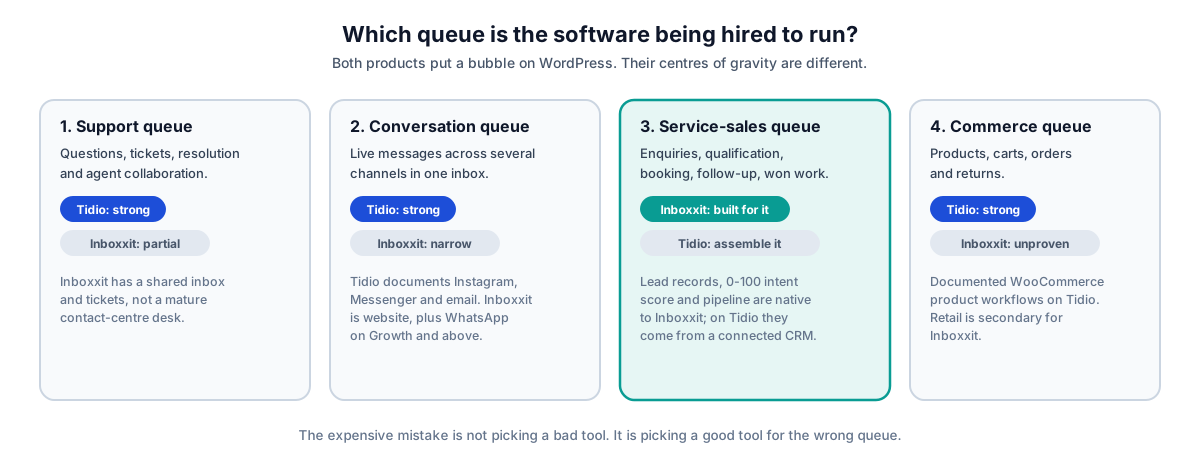
Weight these according to the queue your team actually has to run. A dental practice that needs confirmed appointments should not give WooCommerce product cards the same importance as calendar behaviour. A support team handling Instagram, Messenger and email should not treat a built-in sales pipeline as more important than its channel coverage.
Tidio versus Inboxxit at a glance
Checked on 8 September 2026. Prices, quotas and packaging change often, so verify before buying.
| Decision area | Tidio | Inboxxit | What it means |
|---|---|---|---|
| Operating model | Customer support, live chat, tickets, AI and automation | AI front desk and service-sales CRM | Choose on the work that happens after the first reply |
| WordPress installation | Public WordPress.org plugin, version 8.0.1, 70,000+ active installations, 4.7 out of 5 stars | Supplied plugin ZIP or embed script; no public directory listing | Tidio has by far the stronger public WordPress track record |
| Human live chat | Mature live-agent features, assignment, permissions, macros and support analytics | Human takeover in a shared inbox with the lead record attached | Tidio suits a staffed support operation better |
| Team seats | 10 seats on Free, Starter and Growth | 3 on the entry plan, 5 on Growth, 15 on Professional | Tidio is more generous on seats at the low end |
| AI answers | Lyro answers from supplied knowledge and can call external systems through Actions | Grounded answers from approved business facts, with handoff when confidence is low | Both need useful, maintained source information |
| Contacts and CRM | Contact list with CSV export, plus CRM and Zapier integrations | Automatic lead records, 0 to 100 buying-intent score and a built-in pipeline | Inboxxit is more opinionated about lead ownership |
| Booking | The "Book a call" Lyro Action template calls the Calendly API and gives the visitor the appropriate scheduling link | In-chat booking against real availability, confirmed in the conversation and synced to Google or Outlook | Decide whether a link is enough, or the booking must finish inside the chat |
| Channels | Website chat, WhatsApp, Instagram, Messenger and email | Website; WhatsApp on Growth and above | Tidio offers broader channels; Inboxxit keeps a narrower service workflow |
| Ecommerce | Documented WooCommerce product workflows and Lyro product recommendations | A catalogue exists, but retail is secondary and unproven | Tidio is the safer ecommerce choice |
| Pricing structure | Three separate meters: billable conversations, Lyro AI conversations and Flows visitors | Bundled plans with conversation and AI-reply allowances | Model the whole configuration, not one headline price |
| Evaluation | Free plan, 50 lifetime-free Lyro conversations and a 7-day trial | No free trial; payment at signup with a 30-day money-back guarantee | Tidio is easier to try without paying |
| Maturity | Established platform with a long public plugin history | Earlier-stage product built for a narrower job | Buyers who need extensive public proof should favour Tidio |
Use the handover-burden test before you switch
Subscription prices are easy to see. The work left behind is harder to spot, and it is usually the larger number. Picture a prospective customer asking at 9.17pm whether you serve their area and have a Thursday opening. The AI answers the service-area question correctly. Now run five checks.
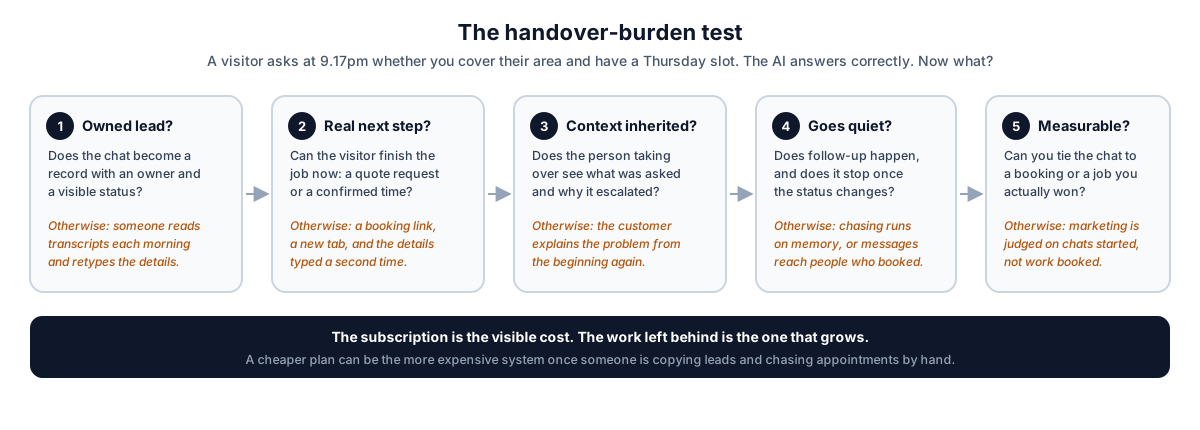
1. Does the conversation become an owned lead?
Tidio keeps a contact list for visitors who provide identifying information, and documents a CSV export of contacts and their properties that you can upload to a CRM. That is useful and flexible, and for many teams it is enough.
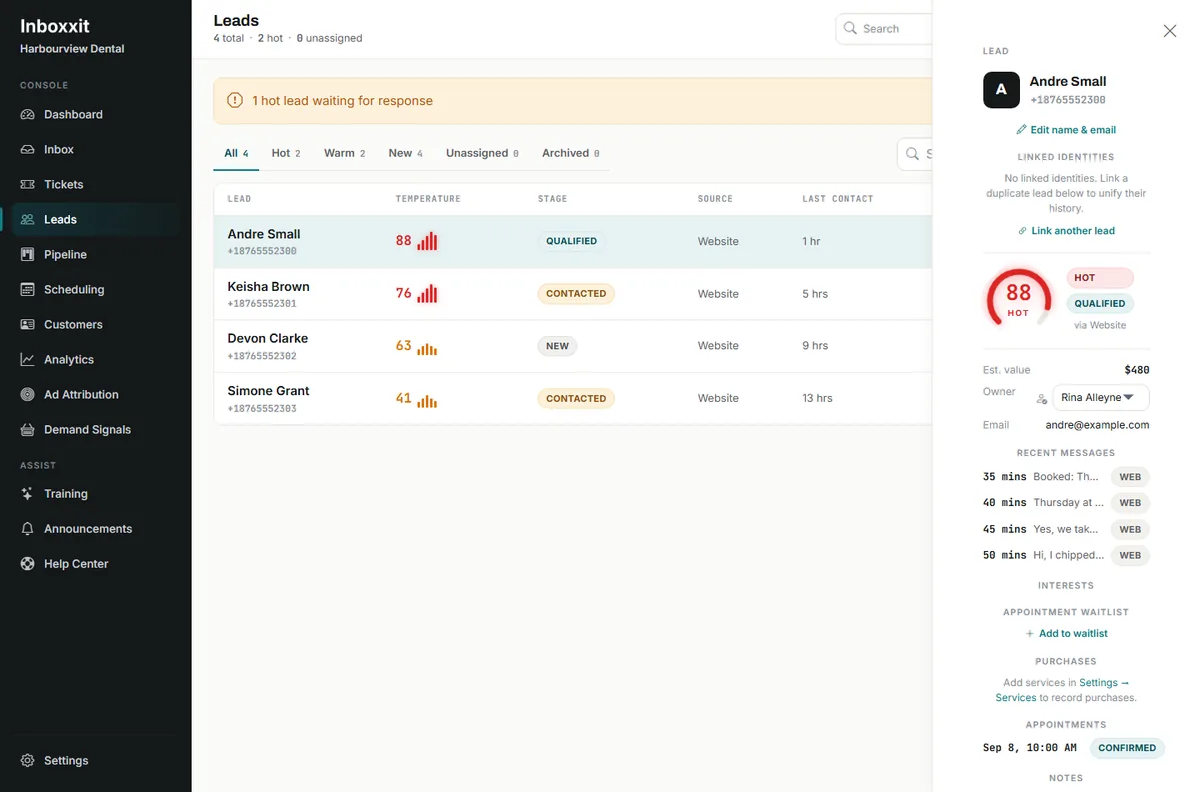
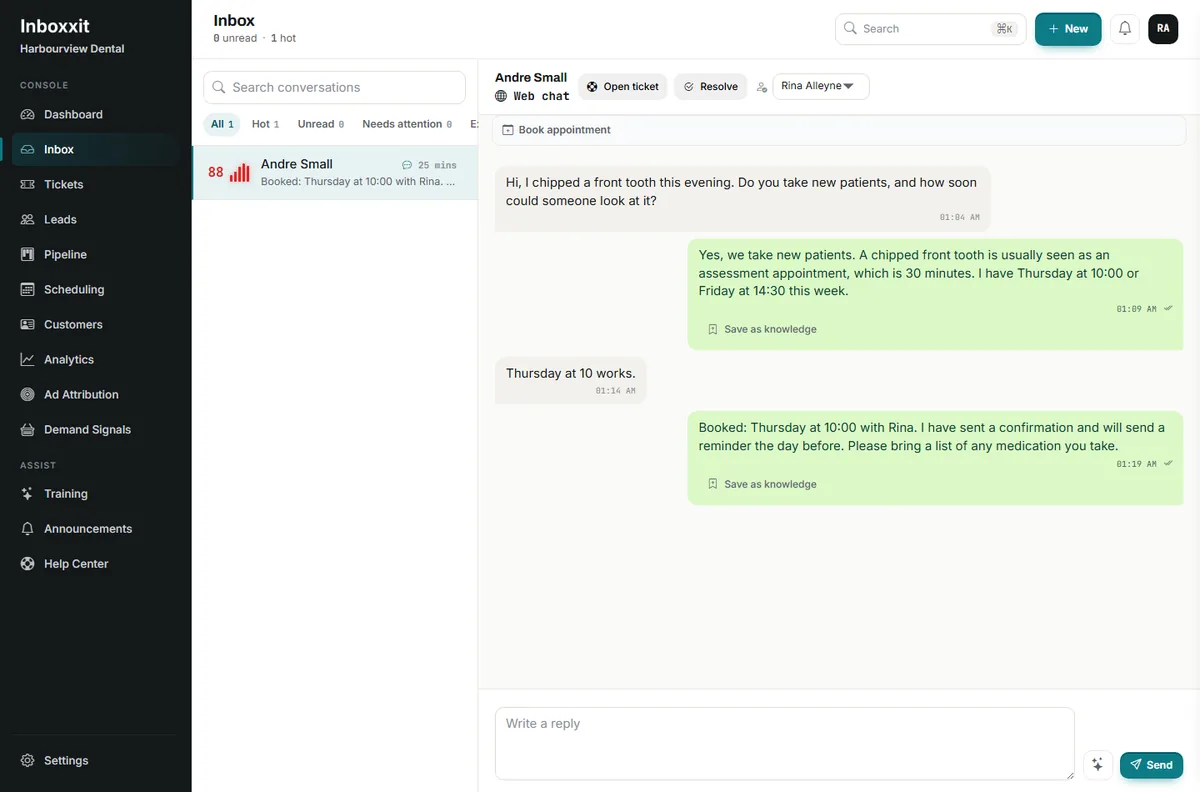
Inboxxit creates the lead record from the conversation, records the service of interest, calculates a buying-intent score from 0 to 100 and places the opportunity in a shared inbox and pipeline with a named owner. The distinction is not "contacts versus no contacts" — both products retain customer information. It is how much service-sales structure exists before you configure a second system.
2. Can the visitor complete a real next step?
This is the row where the two products differ most, and the wording matters. Tidio's help centre documents a "Book a call" Action template that, in its own words, "connects with Calendly API and is able to provide your chat visitor with the appropriate link — so they can schedule an appointment with you". That is a scheduling link handed to the visitor, and it depends on an external Calendly account. It is a perfectly reasonable design, and Tidio's Actions can exchange data with other APIs too, which gives a technical team real room to build.
Note one commercial detail before you plan around it: Tidio's own pricing comparison states that your first Action is free and that full Actions access requires the purchase of a paid Lyro AI Agent quota. So the Calendly route is not simply included with a support plan.
Inboxxit on Growth and above keeps booking inside the conversation. The assistant checks real availability, respects business hours and closed days, holds the selected time while it collects the remaining details, creates the appointment after the customer confirms, and syncs to Google or Outlook Calendar. Reminders, rescheduling and a waitlist are part of the same workflow.
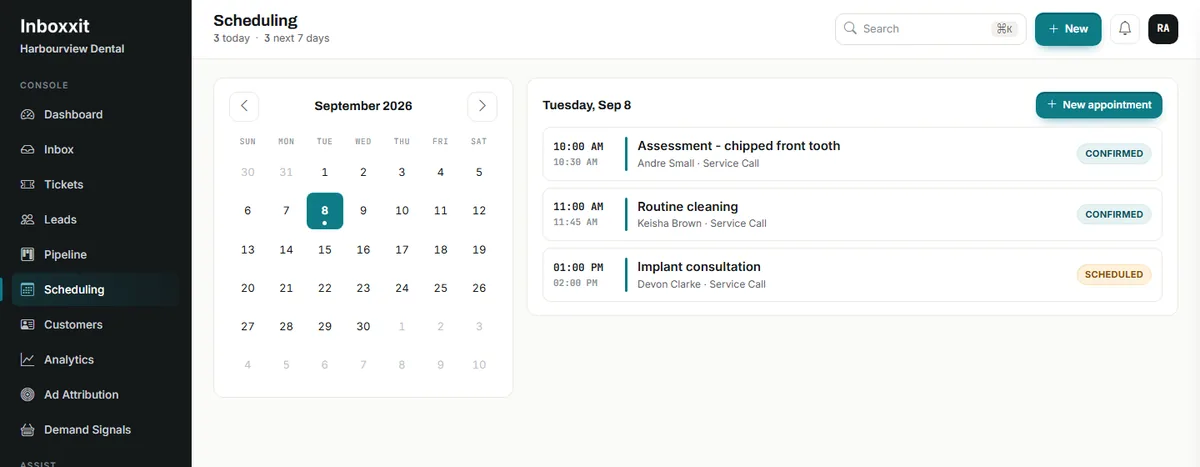
Capacity is also worth stating precisely, because it is often described loosely. Inboxxit's setting is the number of appointments each person takes at once, from 1 to 20. You tick the people who share the work, jobs are spread between them, and each person's own connected calendar is checked before their name goes on a visit. What it does not do is model rooms, chairs, bays or equipment as separately bookable resources — if a booking has to reserve a specific chair as well as a person, compare specialist scheduling software.
3. Does a person inherit the context?
Both products support human involvement, and here Tidio is the more developed environment: agent workflows, tickets, permissions, macros and a long public operating history. If several staff spend the day actively answering chats, that depth matters and Inboxxit does not replace it.
Inboxxit keeps the conversation attached to the lead so a small team can see what was asked, why the system handed over and what was already captured. If one or two people mainly need to rescue high-intent enquiries between jobs, that shape may be more useful than a full support desk.
4. What happens if the customer goes quiet?
Tidio Flows and Lyro can automate customer interactions, and its integrations can pass contacts into other marketing and CRM systems. Inboxxit Growth and above include follow-up for situations such as a new lead, a stalled enquiry, a stalled quote, a review request or a waitlist, sitting beside the lead and booking workflow rather than starting as a separate automation project.
Either way, WhatsApp follow-up obeys Meta's rules. Once the 24-hour customer-service window closes, an approved template may be required to reopen the conversation. Neither platform is permission to message people without limits or consent.
5. Can you connect the chat to booked or won work?
Tidio provides support, automation and agent analytics and can connect to external systems. For a support team, resolution, response time and satisfaction are the right measures.
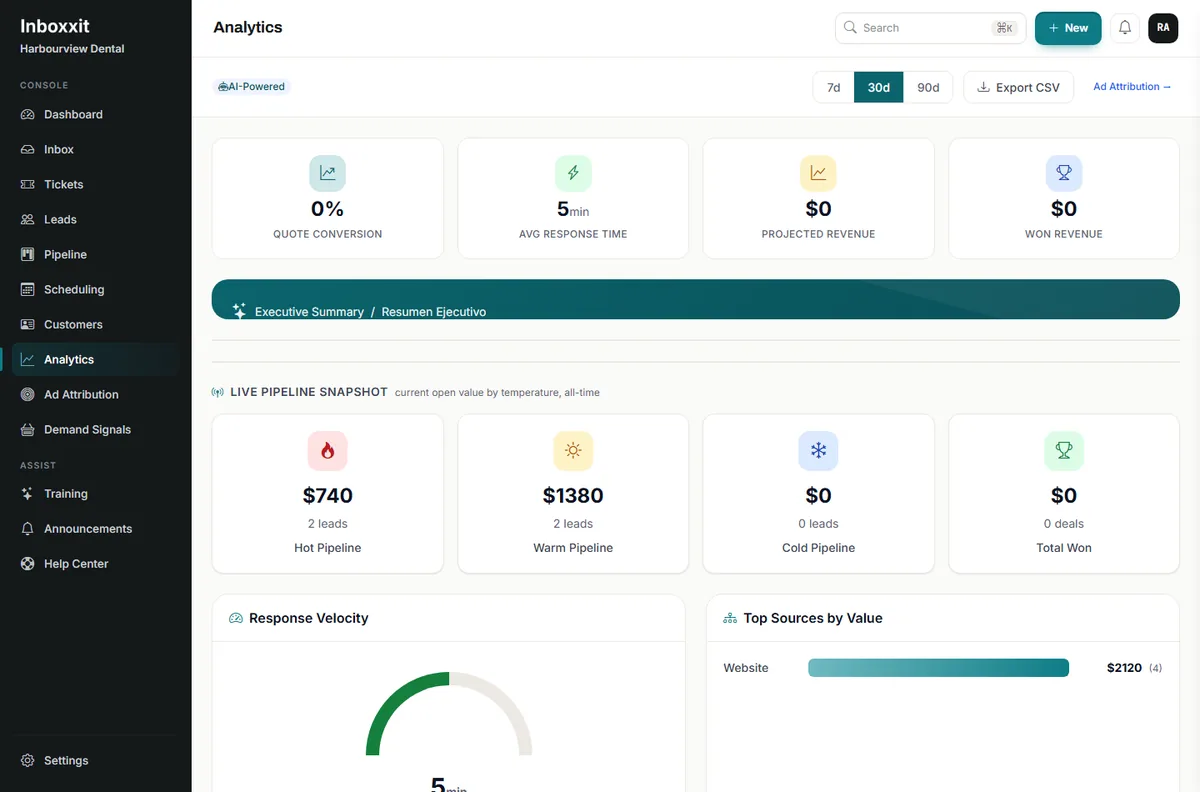
Inboxxit measures the service-sales queue instead: quote conversion, projected and won revenue, open pipeline by temperature and value by source. On Growth and above, eligible booking and won-work conversion information can be sent to Meta and Google.
When Tidio is the better choice
Inboxxit should not replace Tidio simply because a comparison page needs a winner. Tidio is likely the better fit when:
- Your team actively staffs live chat. Agent assignment, permissions, tickets, macros and support analytics are built for that work, and Tidio includes 10 seats even on its lower plans.
- Instagram, Messenger or email belongs in the same inbox. Inboxxit's channels are the website and, on Growth and above, WhatsApp. Nothing else.
- You run a WooCommerce store. Tidio documents product workflows and Lyro product recommendations. Inboxxit's retail capability is secondary and unproven.
- You want a mature public WordPress plugin. 70,000+ active installations and a 4.7 rating is public evidence Inboxxit simply does not have yet.
- You need a free starting point. Tidio has a Free plan and a 7-day trial of paid features. Inboxxit takes payment at signup.
- You have technical resources for custom workflows. Actions and Flows offer real flexibility when someone can configure, authenticate, test and maintain external connections.
- You need broad multilingual coverage. Inboxxit answers in English and Spanish, with automatic detection of the visitor's language. If you need more languages than that, this is a hard boundary.
For those buyers, switching to a narrower front-desk product would remove capabilities they actually use.
When Inboxxit is the better choice
Inboxxit is designed for a different operating reality: the owner is not at a desk waiting for the chat notification. Consider it when:
- every useful conversation should enter a simple sales pipeline, with the lead, conversation, service interest and status together;
- the owner needs triage rather than another inbox to read, and a 0 to 100 intent score helps decide what to open first;
- booking must happen while the visitor is still interested, against real availability, with confirmation, reminders, rescheduling and a waitlist;
- the business has genuine simultaneous capacity, set per person from 1 to 20;
- website and WhatsApp are the channels that matter, and WhatsApp should run on your own business number through the official Meta route;
- voice notes remove friction for customers who would rather speak than type — 300 a month on Growth, 1,000 on Professional, none on the entry plan;
- follow-up should be part of the same front desk rather than a separate automation project;
- marketing needs measuring closer to the sale than a chat start.
Inboxxit is a poor replacement when you need a full contact centre, mature ecommerce workflows, a wide social inbox, resource-level scheduling, or years of public plugin history. Our guide to WordPress AI chatbots for service businesses sets out the category boundaries in more detail, and the five-product comparison covers the wider shortlist.
Compare the whole price, not the cheapest visible number
Tidio and Inboxxit package usage so differently that a one-line "cheaper than" claim would be misleading. Tidio prices on three separate meters, and its own calculator makes that explicit.
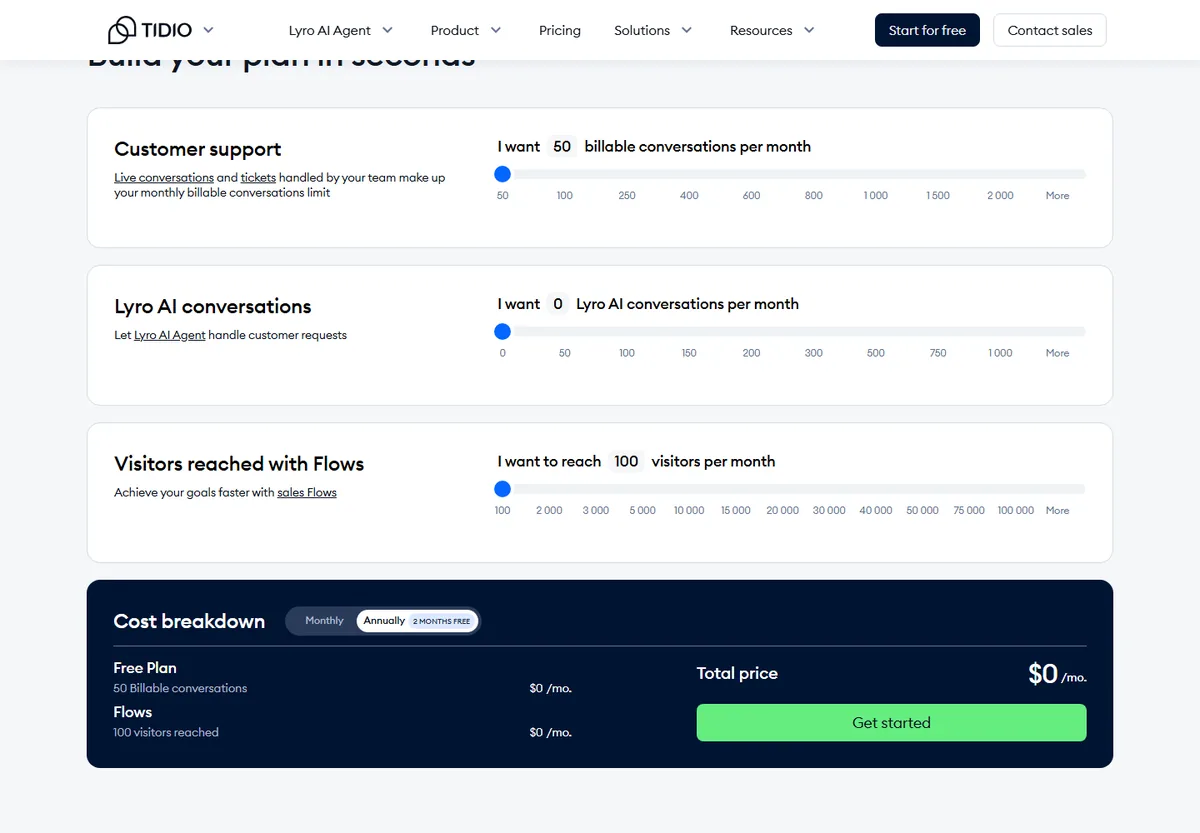
When checked on 8 September 2026, Tidio's published prices were a Free plan at $0 covering 50 billable conversations, Starter at $24.17 per month for 100 billable conversations, Growth from $49.17 per month starting at 250 billable conversations, Plus from $300 per month plus usage, and Premium on request. The Lyro AI Agent is also sold as a standalone product from $32.50 per month covering 50 AI conversations, and Flows from $24.17 per month for 2,000 visitors reached. Every account gets its first 50 Lyro conversations free for life, and a 7-day trial that drops back to the Free plan unless you upgrade.
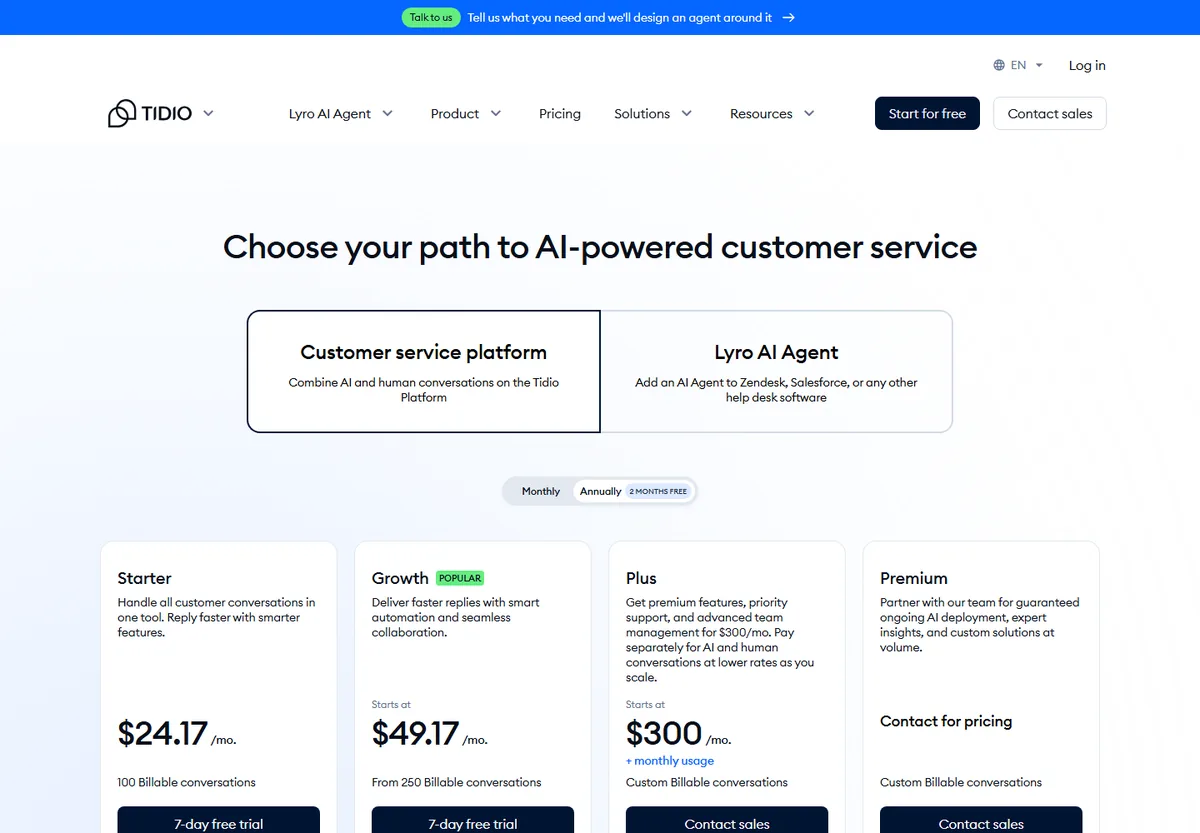
That modular approach is genuinely useful when you know exactly which parts you need. It also means the honest comparison is the total configuration. A service business that wants AI to do most of the answering every month is funding a platform plan and an ongoing Lyro quota — on Tidio's own published starting prices, $24.17 plus $32.50 — before adding Flows, and before the Calendly Action becomes available.
Inboxxit's packages are simpler, and verified against the configuration running the live product on 8 September 2026:
| Plan | Monthly price | What is included |
|---|---|---|
| Website Chatbot | Founder $39, normally $59 | Website answers, 500 conversations, 1,000 AI replies, automatic lead capture, intent scoring, shared inbox and pipeline, handoff rules and knowledge-gap review, 3 team members |
| Growth | $79, normally $99 | 3,000 conversations, 4,000 AI replies, in-chat booking, calendar sync, voice notes, document and website training, follow-up, ad conversion reporting, 5 team members |
| Professional | $149, normally $199 | 10,000 conversations, 10,000 AI replies, API access, advanced analytics, 15 team members |
Every Inboxxit plan is metered, and there is no free trial: payment is collected at signup and a new customer can request a full refund within 30 days of the first payment under the money-back guarantee. Do not compare 500 Inboxxit conversations with 500 Tidio Lyro conversations as though the meters were defined identically. Build a short usage model instead: how many conversations staff will handle, how many AI should handle, how many visitors automation must reach, which channels must be connected, whether booking is native or supplied by another service, and whether you need an external CRM or connector.
WordPress: maturity against a narrower connector
Tidio has the clearer public WordPress path. Its plugin is in the official directory, installs through the normal WordPress flow and connects the site to the hosted Tidio platform.
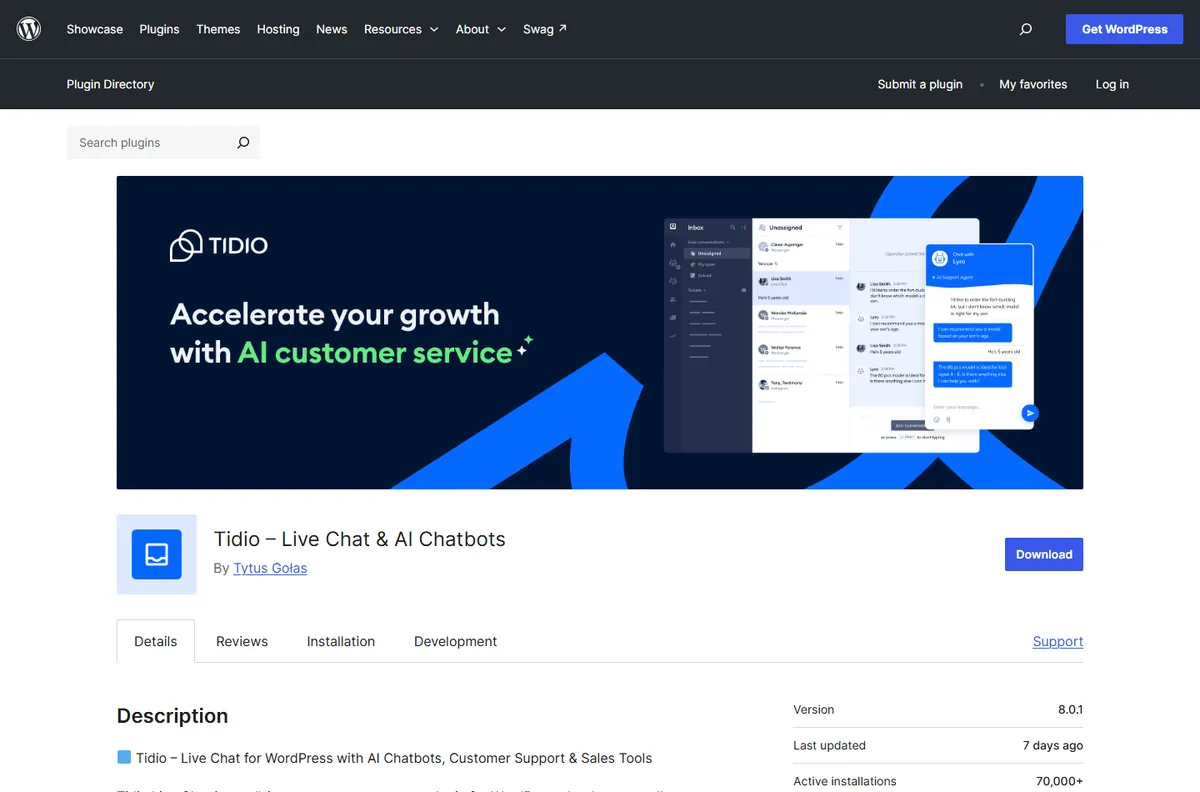
Inboxxit uses the same connector model but without the directory listing: the supplied plugin ZIP or a one-line embed script loads the hosted widget, while the knowledge, leads, inbox, pipeline and settings live in the Inboxxit workspace. Until a public listing exists, "upload the supplied ZIP or use the script" is the accurate instruction, and the WordPress integration guide covers both routes.
Neither plugin turns WordPress into the product. In both cases the visible widget connects to a hosted service. And any third-party script can affect performance depending on your theme, hosting, caching and consent tooling, so measure representative mobile and desktop pages before and after installation. Five minutes to install a plugin is not five minutes to configure a dependable front desk.
A sensible migration checklist
Do not remove the old widget on Friday afternoon and hope the new one has learned everything by Monday.
Before the switch. List the Tidio features you actually use, including live chat, tickets, channels, Flows, Lyro, contacts and integrations. Export the data you are entitled to retain — Tidio documents a CSV contact export; confirm separately what you can get for conversations and tickets. Decide whether the new system must resolve existing-customer problems, capture new enquiries, or both. Record who owns the website, the WhatsApp number, and any social and email workflows. Copy across current hours, service areas, prices, policies and escalation rules rather than every old answer unreviewed.
During setup. Name the person who watches new leads, the expected response time and what happens outside working hours. Connect the right calendar with real business hours, reminders and capacity if booking matters. Test WhatsApp on its own: number ownership, Meta approval, templates and the customer-service window each need checking. Run awkward questions through the assistant — old prices, out-of-area requests, vague wording and topics it should refuse. Above all, avoid two competing chat bubbles on the same page; use staging or a page-by-page transition.
After launch. Compare against a baseline you set beforehand: identifiable leads, booked appointments, response time, handoffs and unowned conversations, not just total chats. Review knowledge gaps weekly at first. Keep an exit path documented — how the widget is disabled, how data is exported and who owns each integration.
One point deserves care rather than a checkbox. Exporting a customer contact list and loading it into a new platform is a processing decision, not just a file transfer. In Jamaica the Data Protection Act, 2020 has been fully enforceable since December 2023 and is overseen by the Office of the Information Commissioner; Barbados and the Bahamas have their own regimes in force, and Trinidad and Tobago's 2011 Act is only partly proclaimed. Check what you told those customers when you collected their details, and keep the categories Inboxxit's privacy policy prohibits — health information, government identification numbers, financial credentials, biometric data — out of the migration entirely.
Choose by scenario
| Your situation | Recommendation |
|---|---|
| A five-person team handling support all day | Tidio. Live agents, tickets, routing and several channels define the operation, and Inboxxit's pipeline does not replace a mature support desk. |
| A WooCommerce store | Tidio, unless Inboxxit's retail behaviour has been reviewed for your exact use case. Tidio has the more established WooCommerce path. |
| A mechanic, salon, clinic or consultant losing after-hours enquiries | Inboxxit. The chain that matters is answer, identify, score, own and move to the next step. Growth is the relevant plan when the customer should book inside the conversation. |
| A business that relies on Instagram and Messenger | Tidio. Inboxxit does not cover those channels, and should not be chosen on the assumption that it might. |
| A WhatsApp-led business that also needs booking and pipeline visibility | Compare both carefully, and ask us about WhatsApp timing first. Tidio supports WhatsApp today; Inboxxit builds it into Growth and above but is not selling it publicly while Meta business verification completes. |
The decision
Tidio is not the wrong choice because it is broad. Breadth is valuable when the business genuinely needs live support, tickets, social messages, ecommerce or custom automation, and Tidio is demonstrably good at those things.
Inboxxit is not the right choice merely because it is purpose-built. A narrower product still has to match your channels, maturity requirements, privacy obligations and operating process.
Choose Tidio when the centre of the operation is customer support. Choose Inboxxit when a WordPress or WhatsApp conversation needs to become a visible service opportunity: answered from approved information, captured with context, prioritised, booked when appropriate, followed up and measured through the pipeline.
If your workflow involves calendar rules, a WhatsApp number migration, regulated information or several simultaneous bookings, talk to us first and verify the whole setup before paying. The Website Chatbot plan covers web enquiries and CRM visibility; the booking assistant on Growth is what makes the appointment happen inside the chat.
How we checked
Tidio's prices, quotas, plan contents, trial terms, Actions gating, plugin version, active installations and rating were read from Tidio's own pricing page, help centre and WordPress.org listing on 8 September 2026. Inboxxit's prices, allowances, feature gates, booking behaviour, language options and voice-note limits were verified against the configuration that runs the live product on the same day, not against a marketing page. Every Inboxxit screenshot here was captured from the running product in September 2026; the two diagrams are ours. Tidio changes packaging frequently, so we will recheck these numbers and note material changes in the updated date at the top.
- Tidio pricing and the Tidio WordPress.org listing
- Lyro Action templates, including the "Book a call" Calendly template, and Lyro Actions
- The Tidio Contacts List and its CSV export
- Tidio's WhatsApp integration guide
- Inboxxit pricing, the Website Chatbot plan, the booking assistant and the WordPress integration guide
- Inboxxit terms and privacy policy, for the money-back guarantee and the prohibited data categories
The handover-burden test
Five checks on the work a WordPress chatbot leaves for the team after it answers, in the order an enquiry runs into them.
-
Does the conversation become an owned lead?
A record with an owner and a visible status, not a transcript to read.
-
Can the visitor complete a real next step?
A quote request or a confirmed time, without starting again elsewhere.
-
Does a person inherit the context?
Whoever takes over can see what was asked and why it escalated.
-
What happens if the customer goes quiet?
Follow-up happens, and stops when the status changes.
-
Can you connect the chat to booked or won work?
Marketing judged on work booked rather than chats started.
Frequently Asked Questions
Is Inboxxit always cheaper than Tidio?
No. The products meter usage differently. Tidio prices billable conversations, Lyro AI conversations and Flows visitors on three separate meters, while Inboxxit bundles the front-desk workflow inside plans with conversation and AI-reply allowances. Tidio also has a free plan and gives 10 seats on its lower tiers against Inboxxit's three. Compare the full configuration for your usage, including any external tools and manual work.
Can I run Tidio and Inboxxit on the same WordPress site?
Two hosted widgets can technically coexist, but showing both to the same visitor is confusing and complicates consent, page performance and conversion tracking. Use a staging site or a controlled page-level test rather than launching two competing chat bubbles across the whole site.
Will I lose my Tidio data if I switch?
Do not assume everything transfers. Tidio documents a CSV export of contacts and their properties; conversations, tickets, custom fields and connected-system data may need separate handling. Decide what must be retained, export it before you remove anything, and confirm what Inboxxit can import. Treat the export as a data-protection decision, not just a file transfer.
Do Tidio and Inboxxit both support WhatsApp?
Tidio documents a WhatsApp integration today. Inboxxit builds WhatsApp into Growth and above through your own business number and the official Meta route, but it is not on public sale while Meta business verification completes, so confirm timing before buying for WhatsApp. In either product, Meta's requirements, message templates and the 24-hour customer-service window still apply.
Does Inboxxit offer a free trial like Tidio?
No. Tidio has a free plan and a 7-day trial of paid features, after which the account returns to the free plan unless you upgrade. Inboxxit has no free trial: payment is collected at signup and new customers can request a full refund within 30 days of the first payment. Buyers who require a no-payment test should choose accordingly.


