
On this page
- The short answer
- First decide what job the chatbot must do
- How we evaluated the tools
- Best WordPress AI chatbots for service businesses compared
- 1. Inboxxit: best for a service front desk tied to a CRM
- Where Inboxxit is strongest
- Where Inboxxit is not the best fit
- 2. Tidio and Lyro: best when live chat comes first
- Where Tidio is strongest
- Where Tidio can be a weaker fit
- 3. Chatbase: best for a flexible AI agent with integrations
- Where Chatbase is strongest
- Where Chatbase can be a weaker fit
- 4. WPBot: best for WordPress-native control
- Where WPBot is strongest
- Where WPBot can be a weaker fit
- 5. Mika AI Chat: best for simple appointment requests
- Where Mika is strongest
- Where Mika can be a weaker fit
- Use the five-job front-desk test
- 1. Answer safely
- 2. Capture the opportunity
- 3. Create ownership
- 4. Move to a real next step
- 5. Continue after the chat
- Best choice by scenario
- Solo service business that mainly needs website coverage
- Clinic, salon or appointment-led team
- Team that needs live human chat
- WhatsApp-heavy service market
- WordPress agency installing for several clients
- Pricing questions that prevent expensive surprises
- Final verdict
- How we checked
A customer asks for a quote while the plumber is under a sink. Someone wants a dental appointment while the receptionist is helping the patient standing in front of her. A driver asks whether a mechanic can look at a warning light, but every hand in the workshop is busy.
That is the real test of a chatbot for a service business. It is not simply whether the bot can produce a polished answer. It is whether the conversation becomes a lead that someone can see, own and move towards a booking or sale.
The short answer
There is no single best WordPress chatbot for every website. For a service business, the best WordPress AI chatbot in 2026 is the one that handles the step after the answer: capturing the enquiry, giving it an owner and moving it to a booking. In this comparison, Inboxxit is the strongest fit for that job. Tidio wins when live human chat comes first, Chatbase when you want a flexible AI agent with integrations, WPBot when you want control inside WordPress, and Mika when a lightweight appointment-request assistant is enough.
- Inboxxit is our pick for service businesses that want a website conversation to become a scored lead inside a shared inbox and sales pipeline. In-chat booking, knowledge-base training, voice notes and automated follow-up are available on Growth and above.
- Tidio with Lyro is a strong choice when live human chat and AI-assisted customer support are the centre of the operation.
- Chatbase suits businesses that want a flexible AI agent trained on their content, with lead capture, helpdesk escalation and actions such as Calendly.
- WPBot is best for WordPress owners and agencies that want a native plugin, more control inside WordPress and yearly or lifetime licence options.
- Mika AI Chat is a lightweight option for local businesses that want grounded answers, lead capture and appointment requests without a large software stack.
Inboxxit publishes this guide, so naturally we know our own product best and have a commercial interest in the comparison. We have not pretended to conduct hands-on laboratory testing of every competitor. The competitor details below were checked against official pricing pages, documentation and WordPress.org listings on 7 September 2026, and Inboxxit's own claims were verified against the plan configuration that runs the live product on the same day.
First decide what job the chatbot must do
Many comparison articles put live-chat tools, WooCommerce assistants, documentation bots and AI receptionists into one long table and call one of them the winner. That is how a useful comparison turns into porridge.
Start with the job:
- Service front desk: answer questions, capture the person and their intent, hand over uncertain enquiries, book the next step and keep the lead moving.
- Live customer support: give staff a shared inbox, let them take over conversations and use AI to handle repetitive questions.
- Knowledge-base assistant: train an agent on webpages and documents so visitors can find accurate answers quickly.
- WordPress-native toolkit: keep more configuration inside WordPress, connect your own AI provider and accept more responsibility for setup and maintenance.
- Store assistant: search products, answer order questions and support cart or checkout activity.
This guide is mainly about the first job. If you run a WooCommerce store and your biggest problem is product discovery, order status or cart recovery, use an ecommerce comparison instead. A dental practice and an online shoe store may both use WordPress, but their front desks do not work the same way.
How we evaluated the tools
We used six criteria that matter to a small service business:
- WordPress path: is there an official plugin, a simple script installation or a more technical setup?
- Answer control: can the assistant work from approved business information and avoid confidently inventing prices, policies or availability?
- Lead ownership: does the conversation become a lead with contact details, context and a clear place for the team to work it?
- Booking: can it show or use real availability, take an appointment request or send the visitor elsewhere to book?
- Human handoff and channels: can the team take over, and can the system support the channels customers actually use?
- Real cost and operating effort: what is included, what is metered and how much work remains after installation?
We did not award points simply because a product has more features. A long feature list is not much comfort if the customer gets a lovely answer and the lead disappears into an inbox nobody checks.
Best WordPress AI chatbots for service businesses compared
Prices below are in US dollars and reflect published information checked on 7 September 2026. Plans and allowances change, so confirm the current details before buying.
| Tool | Best fit | WordPress path | Lead and booking | Starting point | Watch-out |
|---|---|---|---|---|---|
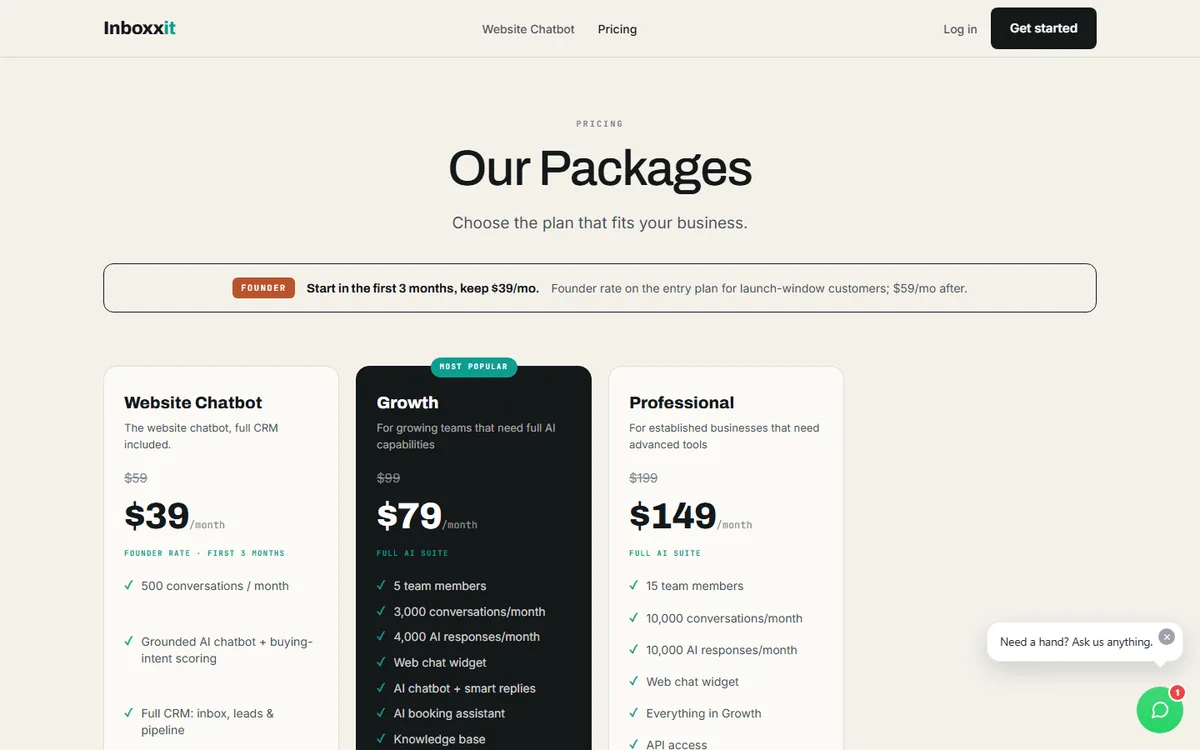
| Inboxxit | Service-business front desk plus CRM | WordPress connector plugin from your account, or a one-line script | Lead capture, buying-intent score, shared inbox and pipeline; in-chat booking on Growth and above | $39/month founder rate for the website-only plan (list $59); Growth $79/month launch price (list $99) | Not designed as a WooCommerce cart assistant; document and website training start on Growth |
| Tidio + Lyro | Live chat and AI customer support | Official WordPress plugin (70,000+ active installations) | Lead generation, live-agent takeover and configurable Flows; scheduling needs a flow or an integration | Lyro from $32.50/month for 50 AI conversations; 7-day trial | Costs and quotas span separate products, so price the complete setup rather than one headline number |
| Chatbase | Flexible hosted AI agent with actions and integrations | Official embed plugin that loads the agent by ID | Form or conversational lead capture, helpdesk escalation and a Calendly availability action | Free plan with 50 message credits; Hobby $40/month with 700 credits and a 7-day trial | More flexible than a basic FAQ bot, but a service-business pipeline still needs deliberate configuration |
| WPBot | Native WordPress control and agency-friendly licences | Native WordPress plugin | Conversational forms, webhooks and optional messaging modules; the operator assembles the workflow | From $39/year for one site, or $149 lifetime for five sites | More setup and maintenance; AI-provider usage may add separate costs |
| Mika AI Chat | Lightweight local-service assistant and appointment requests | WordPress.org plugin plus API key | Captures leads and preferred appointment times for the team to confirm | Free at roughly 30 conversations/month; paid plans from $9.99/month with a 14-day trial | Appointment requests are not confirmed calendar bookings, and there is no live-agent queue |
1. Inboxxit: best for a service front desk tied to a CRM
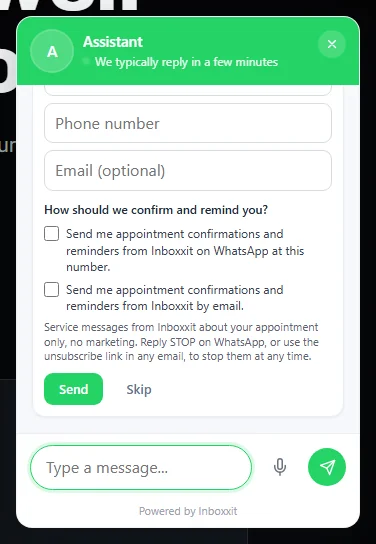
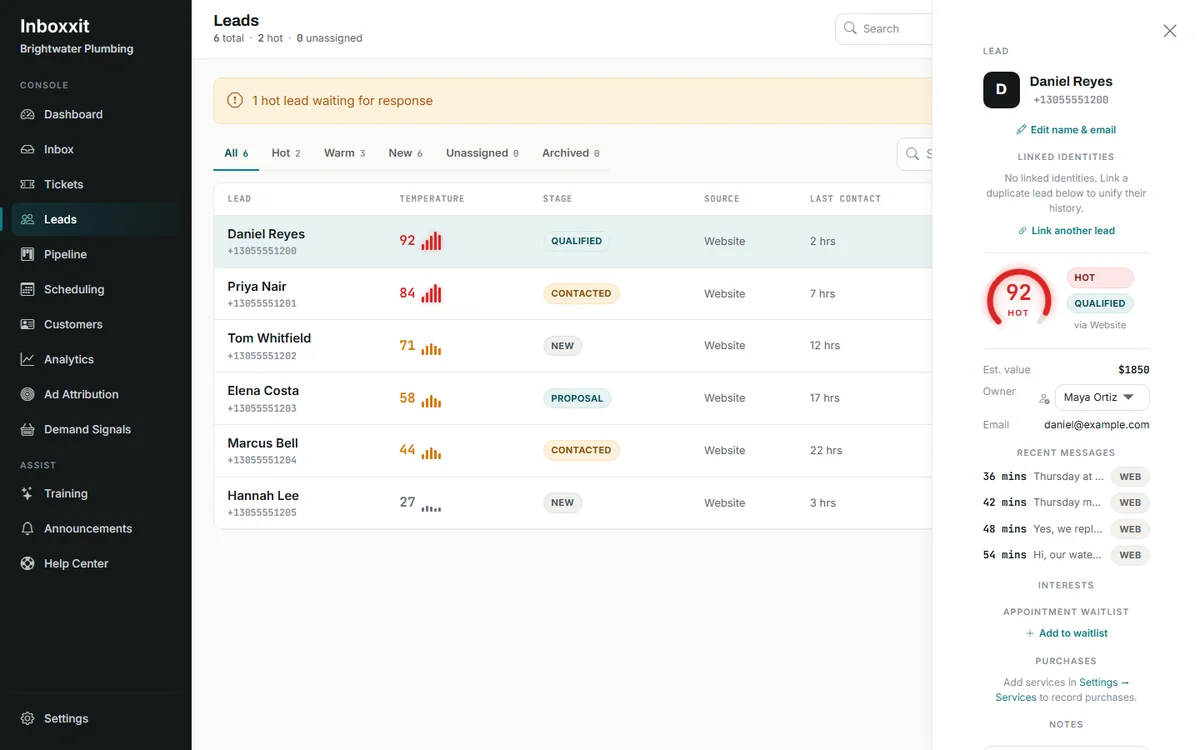
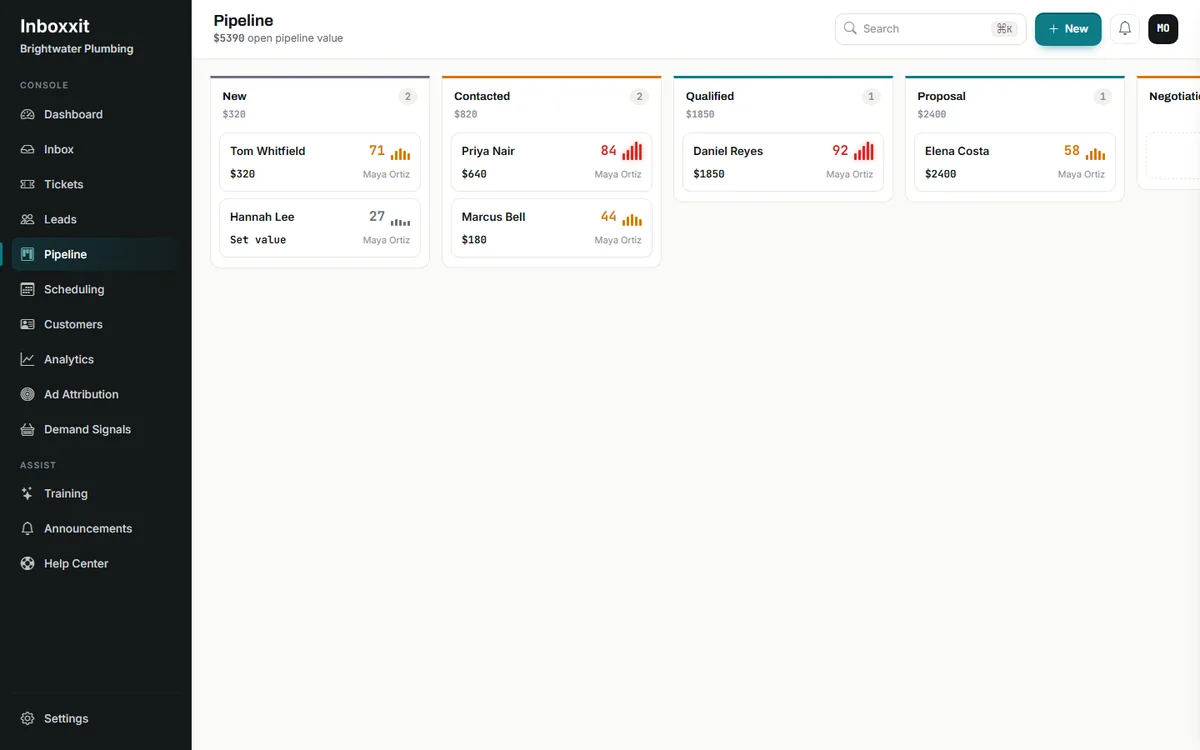
Inboxxit is designed around what happens after the first answer. The website assistant responds from information supplied by the business, captures the visitor as a lead, scores buying intent from 0 to 100 and records the service or product the person is interested in. The conversation then sits inside a shared inbox and sales pipeline rather than becoming an isolated chat transcript.
That fit matters for a small team. The owner may be repairing a vehicle, teaching a class or treating a patient. The system's job is to cover the front door without pretending the human team is unnecessary.
Where Inboxxit is strongest
- Service-business information such as contact details, hours, service areas, prices and policies guides the answers. Growth and above can also train the assistant on uploaded documents and website pages.
- When confidence is too low, the conversation is handed to a person instead of producing an unsupported answer.
- Contact details, the conversation and the buying-intent score stay with the lead in the inbox and pipeline.
- Growth and higher plans add in-chat booking from real calendar availability, AI-suggested replies for the team, voice notes and automated follow-up messages.
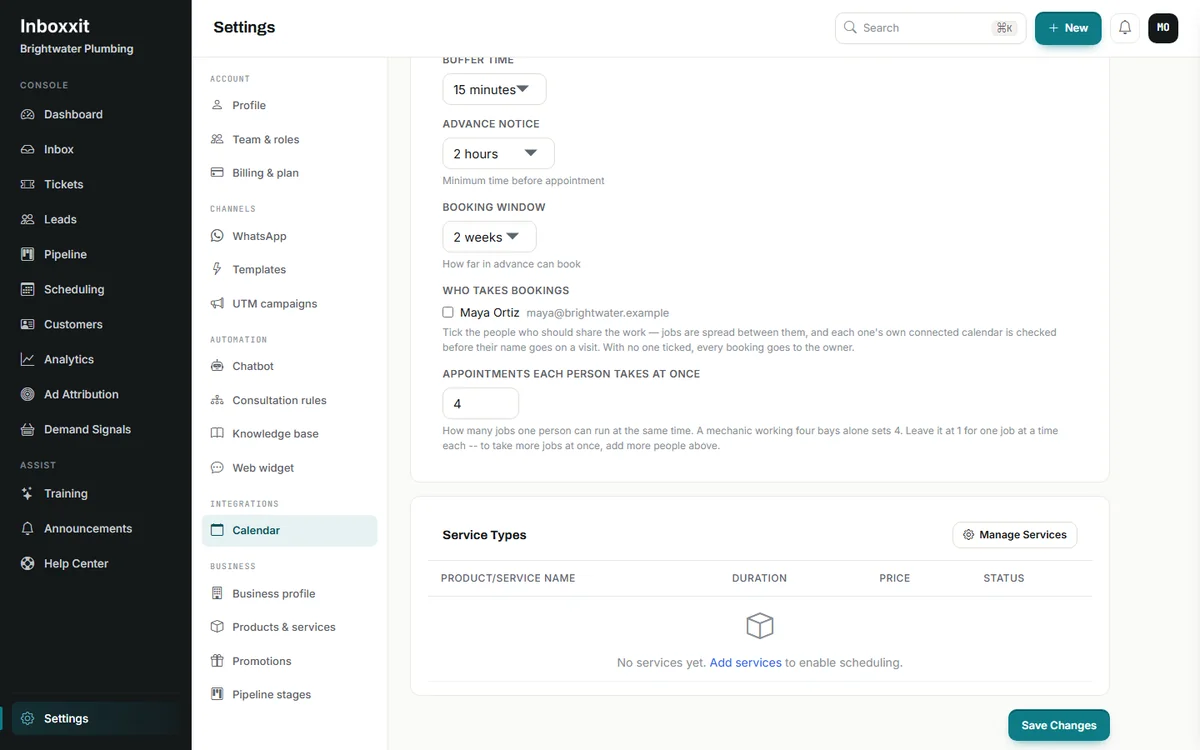
- Booking capacity is set per person, from one to 20 appointments at the same time. That can reflect several service bays, chairs or practitioners without claiming that the system assigns a particular physical resource.
Where Inboxxit is not the best fit
Inboxxit is not positioned as a proven WooCommerce retail engine. It can hold catalogue information, but businesses whose main goal is product search, order support or cart recovery should evaluate store-focused tools.
The $39 founder Website Chatbot plan is website-only and answers from your business profile. In-chat booking, knowledge-base training, voice notes and automated follow-up require Growth or above. WhatsApp is built into the Growth tier but is not on public sale while Meta business verification completes, so if WhatsApp is your front door today, confirm timing with Inboxxit before you buy.
Choose Inboxxit when: the business wants one service-focused path from enquiry to lead, booking and follow-up, rather than an AI answer layer that must be connected to several other tools.
2. Tidio and Lyro: best when live chat comes first
Tidio is the most established WordPress option in this shortlist by public plugin adoption: its official WordPress plugin lists more than 70,000 active installations and was tested up to WordPress 7.1 when checked. The plugin combines a website widget, live chat, lead generation and AI automation. Lyro answers from the support content supplied to it, while Tidio Flows can collect information and guide visitors through scripted paths.
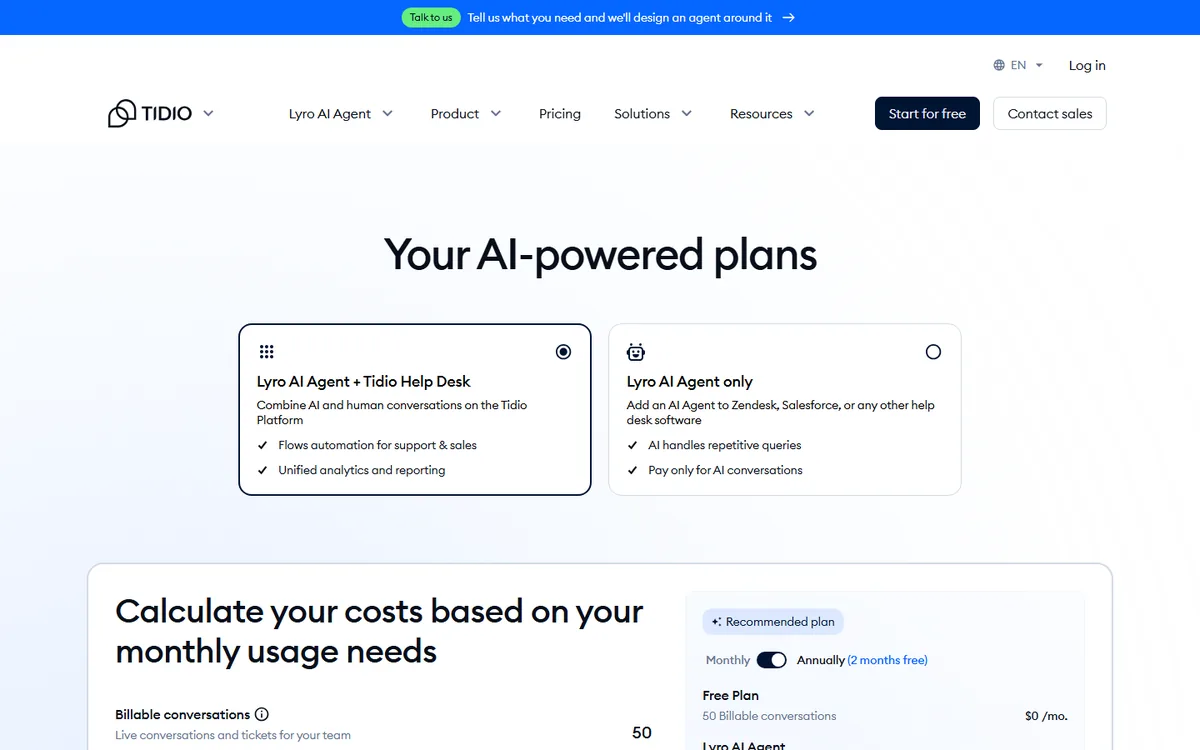
The important buying detail is that Tidio is a platform made up of related products. Customer Service, Lyro and Flows can be bought separately or combined. The official pricing page lists Lyro from $32.50 per month for 50 AI conversations, Customer Service plans from $24.17 per month for 100 billable conversations, and a seven-day trial. A team may need a Customer Service plan and additional automation capacity on top of Lyro.
Where Tidio is strongest
- A mature live-chat experience with human takeover.
- An official WordPress plugin with a large, actively maintained install base.
- AI answers and rule-based Flows can work together.
- A sensible fit for teams that already operate like a customer-support desk.
Where Tidio can be a weaker fit
Tidio can capture leads and identify intent, but its centre of gravity is customer service and support rather than a service-business sales pipeline. A clinic or contractor should map the full workflow before buying: where does the lead go, who owns it, how is an appointment confirmed and what happens after the conversation stalls?
Choose Tidio when: staff-led live chat matters as much as automation and the team is comfortable managing separate conversation and AI allowances.
3. Chatbase: best for a flexible AI agent with integrations
Chatbase has moved well beyond a simple FAQ embed. Its documentation covers form-based and conversational lead capture, a Calendly action that retrieves available slots, and human escalation into Chatbase's own helpdesk or connected desks such as Zendesk, Intercom, HubSpot and Freshdesk. Additional channels, including WhatsApp, are available through its integrations. The WordPress plugin itself remains a straightforward loader: install it, add the Agent ID and manage the agent in Chatbase.
That makes Chatbase a credible option for service businesses, especially those that already use a separate CRM or helpdesk.
Where Chatbase is strongest
- Flexible training sources and a hosted AI-agent platform.
- Lead details can be collected through a form or naturally during the conversation, with email or phone required, then stored in the Leads activity view, sent to a webhook or emailed to the team.
- The Calendly action retrieves available slots for the visitor, although the booking itself happens in Calendly.
- Human escalation can create a ticket in Chatbase or a connected helpdesk.
- Broad integrations and channels are available as plans increase.
Where Chatbase can be a weaker fit
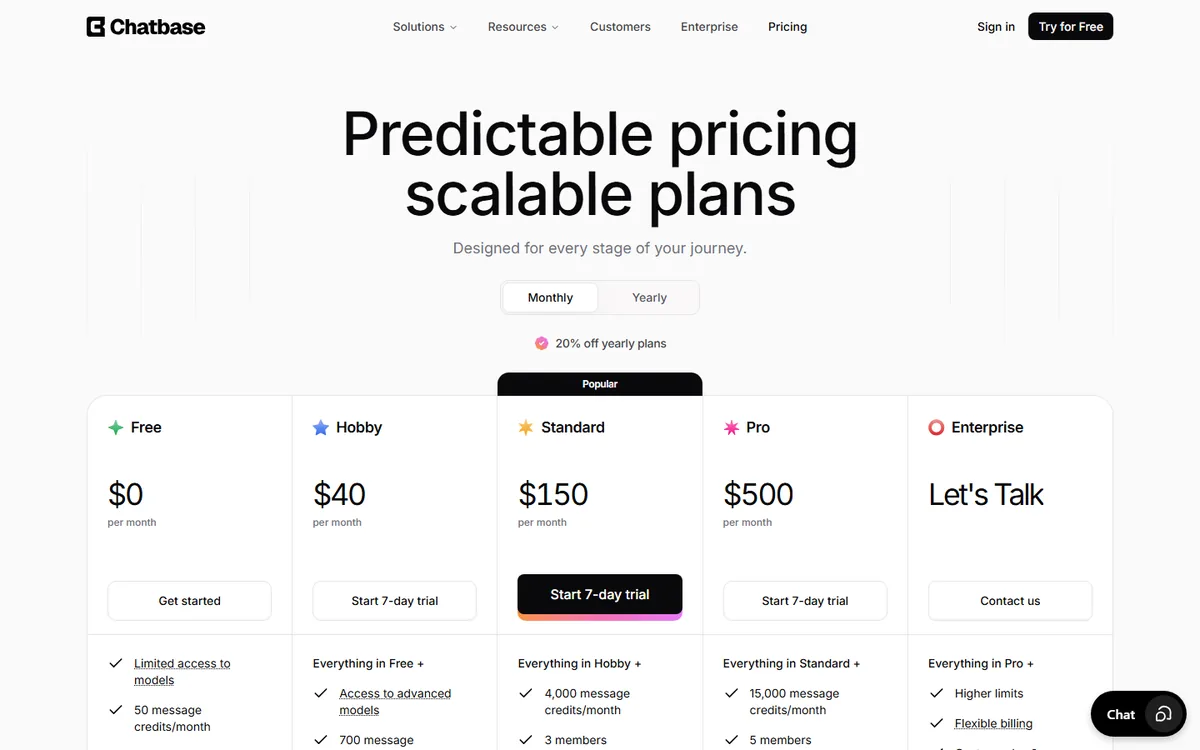
The free plan is small, and the $40 Hobby plan includes 700 message credits and two agents. The Standard plan, which adds the helpdesk, voice, outbound campaigns and advanced integrations, is listed at $150 per month with 4,000 credits.
The WordPress.org plugin is mainly an embed helper rather than the full application. When checked it had been tested up to WordPress 6.7.7, was last updated two years earlier, and carried the directory's warning that it has not been tested with the latest three major WordPress releases. That does not mean the service is broken, but it is a sensible compatibility item to test on a staging site.
Choose Chatbase when: you want a capable, configurable AI agent and are comfortable designing the service workflow around actions and integrations.
4. WPBot: best for WordPress-native control
WPBot takes a different approach. Much of the configuration lives in WordPress, and buyers can choose yearly or lifetime licences. The product supports site search, multiple AI providers, knowledge bases, conversational forms and optional modules for webhooks, messaging, voice and white labelling.
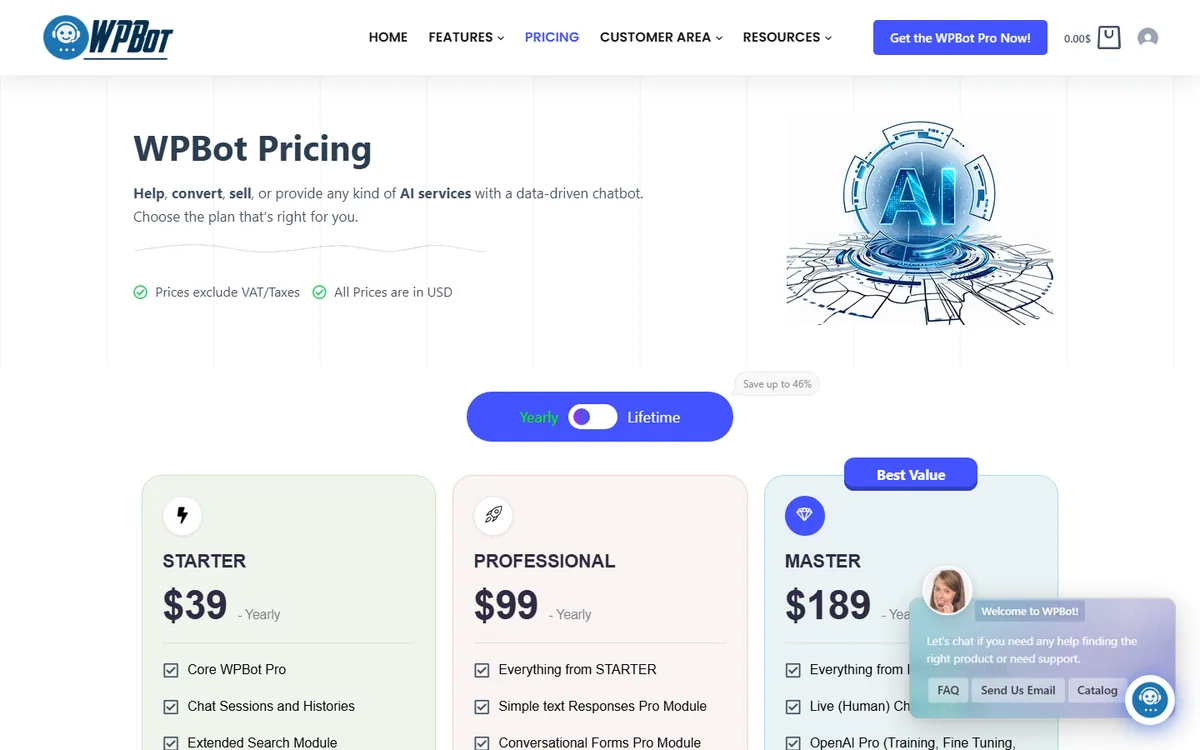
Its published pricing starts at $39 per year for a one-site Starter licence. Professional ($99 per year, two sites) adds conversational forms, the WooCommerce module and advanced retrieval. Master ($189 per year, five sites) adds live human chat through Slack, white labelling, multi-language support and Facebook, Instagram, WhatsApp and Telegram modules, plus voice chat. Lifetime licences are listed at $149, $279 and $369 for five, ten and fifty sites.
Where WPBot is strongest
- Native WordPress administration and a wide range of modules.
- Yearly and lifetime options instead of a per-site monthly SaaS fee.
- Useful licence structures for developers and agencies.
- Flexibility for businesses that want to connect their own AI provider.
Where WPBot can be a weaker fit
Flexibility transfers more responsibility to the person installing it. Forms, API keys, prompts, webhooks, WhatsApp setup and quality assurance still need an owner. The licence price may not include the AI model usage or outside services needed for the finished workflow.
Choose WPBot when: you or your agency want control inside WordPress and have the technical capacity to build and maintain the front-desk workflow.
5. Mika AI Chat: best for simple appointment requests
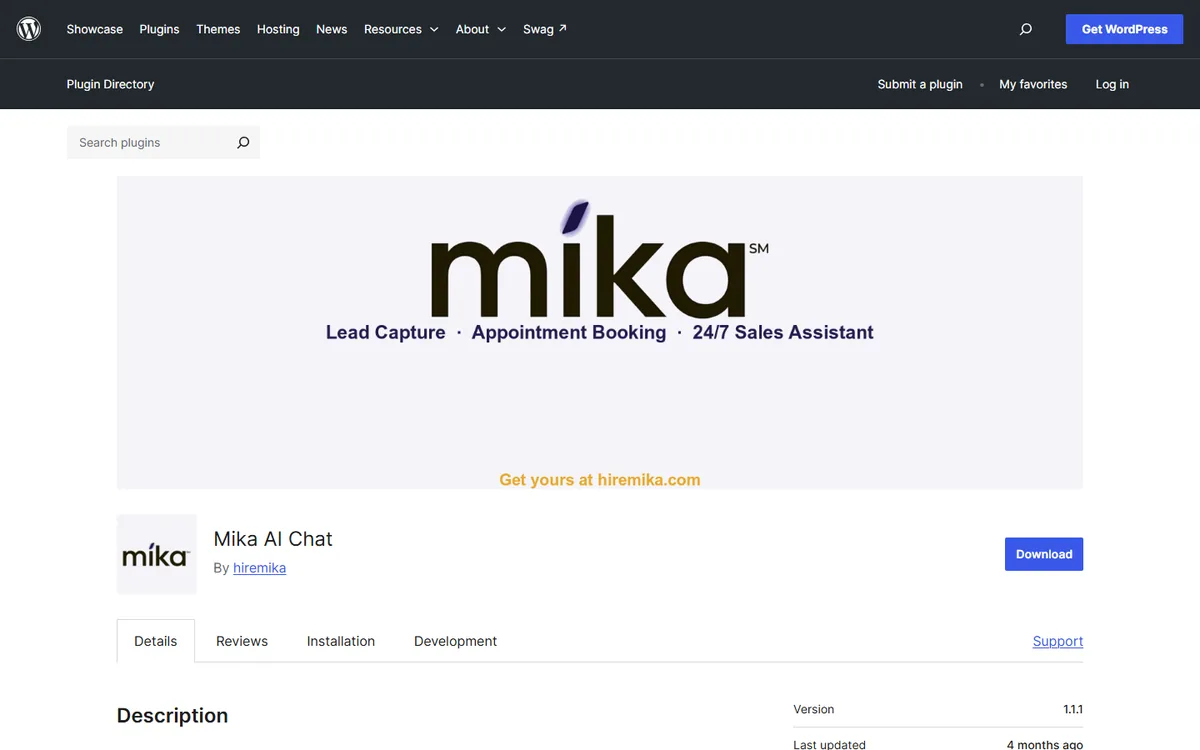
Mika speaks directly to local-service use cases. Its WordPress.org listing describes grounded answers, lead capture with instant email notifications, appointment requests, follow-up email sequences and a privacy mode for healthcare practices, alongside WooCommerce product search. Installation uses a WordPress plugin and API key.
Mika is clear about the difference between a request and a booking. A visitor can provide a preferred date and time, but the business confirms it in its own calendar. That is less automated than a calendar-aware booking assistant, but it is better than pretending a slot has been booked when it has not.
Where Mika is strongest
- Low starting price and a small free plan.
- Clear local-service positioning.
- Appointment requests and lead summaries without a heavy platform.
- Explicit limitations around medical advice and live-agent handoff.
Where Mika can be a weaker fit
There is no live-agent queue; uncertain conversations are sent to the team for follow-up. The listing showed fewer than ten active installations and a plugin last updated about four months earlier when checked, so the public track record is short. Businesses that need confirmed in-chat booking or a full pipeline should compare carefully.
Choose Mika when: you want a lightweight WordPress assistant that answers questions and collects appointment requests for a person to confirm.
Use the five-job front-desk test
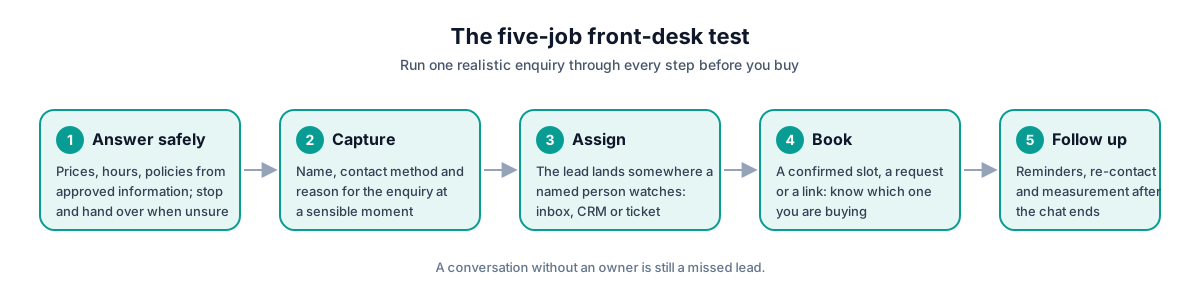
Before choosing any platform, run one realistic enquiry through these five jobs.
1. Answer safely
Ask about a real price, service area, policy and a situation the system should refuse to answer. A responsible assistant should know when to stop and involve a person.
2. Capture the opportunity
Check whether it collects the person's name, preferred contact method and reason for enquiring at a sensible point. A conversation without an owner is still a missed lead wearing nicer clothes.
3. Create ownership
Find out exactly where the conversation goes. Is it a shared inbox, a CRM record, an email, a WordPress database entry or a ticket? Then assign one person to watch that place.
4. Move to a real next step
Determine whether "booking" means a confirmed calendar slot, an appointment request or a link to another tool. All three can work; the problem is buying one while expecting another.
5. Continue after the chat
Ask what happens when the visitor disappears halfway through, needs a reminder or becomes a won customer. The conversation is only the beginning. Follow-up and measurement determine whether the system becomes useful or merely interesting.
Best choice by scenario
Solo service business that mainly needs website coverage
Choose Inboxxit's Website Chatbot plan if you want grounded answers, lead scoring and a CRM path without booking. Choose Mika if a lighter appointment-request workflow is enough. Choose WPBot if you prefer a native plugin and can manage the setup.
Clinic, salon or appointment-led team
Choose Inboxxit Growth when confirmed in-chat booking, reminders and a shared service CRM are important. Inboxxit can also set each person to accept one to 20 simultaneous bookings, which is useful when the business can serve several customers at once. The booking assistant works from connected Google or Outlook calendars.
Choose Mika when staff will confirm appointment requests manually. Choose Chatbase when you already use Calendly and want a flexible agent around it.
For healthcare or regulated services, do not treat any chatbot as a substitute for a compliance review. Decide what information the bot may collect, where it is stored and which questions must go to a human.
Team that needs live human chat
Choose Tidio when agents are expected to take over website conversations throughout the day. Its live-chat and support operation is more mature than a product designed primarily as an automated service receptionist.
WhatsApp-heavy service market
If customers already use WhatsApp as the real front door, confirm the channel before falling in love with the website widget. Chatbase and WPBot both offer WhatsApp modules on their higher tiers. Inboxxit has WhatsApp built into Growth and above but has not put it on public sale while Meta business verification completes, so ask about timing first.
Whatever you choose, do not assume WhatsApp is included in an entry website plan. Ask about Meta approval, message templates, fees and the process for reconnecting with a customer after the permitted service window.
WordPress agency installing for several clients
Choose WPBot when licence economics, native administration and white labelling are contractual requirements and your agency will manage the technical work. Choose Inboxxit when the clients are service businesses and you want a repeatable front-desk and CRM workflow rather than a separate plugin build for each client; the Agency licence covers ten managed client accounts under one subscription.
Pricing questions that prevent expensive surprises
Ask every vendor the same questions:
- What exactly counts as a conversation, message, credit or resolved enquiry?
- What happens when the allowance runs out?
- Are AI usage, seats, Flows, channels or outside API fees charged separately?
- Does booking confirm a real slot, collect a request or show a link?
- Which plan includes WhatsApp, and are Meta charges separate?
- Can a person take over the conversation, and where does that happen?
- If you cancel, what customer and conversation data can you export?
- For an agency, are multi-site use, client access and white labelling genuinely included?
Price the workflow you will actually operate, not the cheapest number on the page.
Final verdict
For a service business, the best WordPress chatbot in 2026 is the one that handles the next step after the answer.
Choose Tidio for live-chat-led support. Choose Chatbase for a flexible AI agent with broad actions and integrations. Choose WPBot for WordPress-native control. Choose Mika for a lightweight assistant that collects appointment requests.
Choose Inboxxit when the job is broader: answer from approved business information, capture and prioritise the lead, keep the conversation in a shared pipeline and, on Growth and above, book the appointment and follow up automatically.
That does not make Inboxxit the best tool for every website. It makes it the strongest fit in this comparison for the service-business front-desk job it was built to do.
Next step: review Inboxxit's current plans and choose the Website Chatbot plan for web coverage, or Growth when you need booking, knowledge-base training, voice notes and follow-up. The founder rate of $39 per month on the entry plan is scheduled to close on 31 October 2026. Inboxxit has no free trial; every plan is covered by a 30-day money-back guarantee instead.
How we checked
Competitor facts come from the vendors' own pricing pages, product documentation and WordPress.org listings, all checked on 7 September 2026. Inboxxit's plan prices, allowances and plan gates were verified against the configuration that runs the live product on the same day. We will recheck the competitor details at least quarterly and note material changes in the updated date at the top of this article.
- Tidio pricing and the Tidio WordPress plugin listing
- Chatbase pricing, the WordPress installation guide, lead collection, Calendly action, human escalation and the Chatbase WordPress.org listing
- WPBot pricing
- Mika AI Chat WordPress.org listing
- Inboxxit pricing, the Website Chatbot plan and the WordPress integration guide
Tools compared in this guide
The five WordPress AI chatbots reviewed, in the order they appear.
-
Inboxxit
Service-business front desk plus CRM.
-
Tidio with Lyro
Live chat and AI customer support.
-
Chatbase
Flexible hosted AI agent with actions and integrations.
-
WPBot
Native WordPress control and agency-friendly licences.
-
Mika AI Chat
Lightweight local-service assistant and appointment requests.
Frequently Asked Questions
What is the best WordPress chatbot for a small service business?
Inboxxit is the strongest fit in this guide when the business wants website conversations to become scored leads in a shared CRM and pipeline. Mika is a lighter option for appointment requests, while Tidio is stronger when live human chat is the priority.
Can a WordPress chatbot book appointments?
Yes, but booking means different things across products. Inboxxit Growth works from real calendar availability and books inside the conversation. Chatbase can retrieve Calendly slots through an action. Mika collects a preferred date and time for the business to confirm. Verify which version you are buying.
Does the chatbot need to be a native WordPress plugin?
No. Many plugins simply load a hosted service. A native plugin can offer more control inside WordPress, while a hosted platform may reduce maintenance and provide a fuller inbox or CRM. Test page speed, compatibility, data handling and ownership of updates either way.
Is Chatbase only an FAQ bot?
No. Chatbase supports lead collection, a Calendly availability action, additional channels and escalation into its own or connected helpdesks. It is still a configurable AI-agent platform, so a service-business workflow may require more setup than a product built around that workflow.
Does Inboxxit include WhatsApp on the $39 plan?
No. The $39 founder Website Chatbot plan is website-only. In-chat booking, knowledge-base training, voice notes and automated follow-up start on Growth. WhatsApp is built into Growth and above but is not on public sale while Meta business verification completes, so confirm timing with Inboxxit before buying for WhatsApp.


