
On this page
- The short answer
- A WordPress AI chatbot and an AI front desk are not the same thing
- Use the enquiry-to-work chain before comparing features
- How Inboxxit works on a WordPress site
- 1. Connect the website
- 2. Give the assistant approved business information
- 3. Turn the conversation into a lead the team can see
- 4. Let a person take over
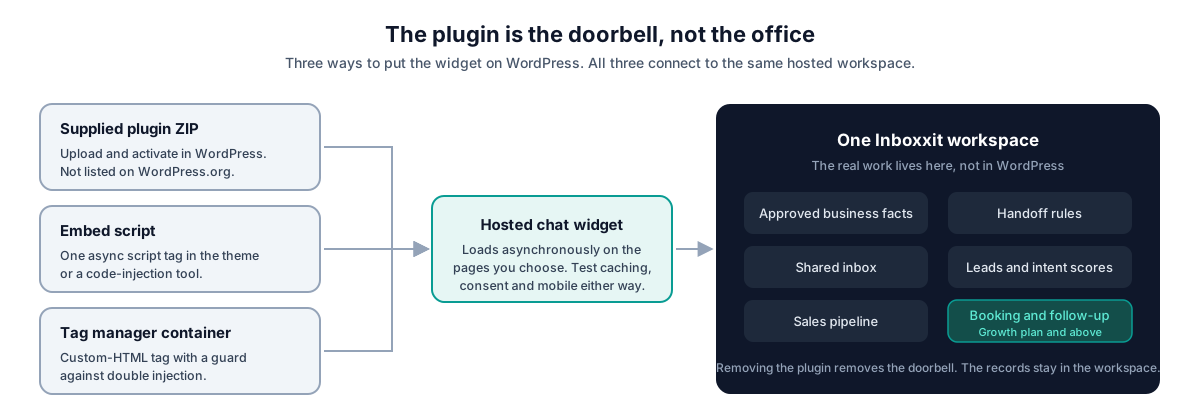
- The plugin is the doorbell, not the office
- Plugin, script or tag manager: which installation path?
- Choose the plan by the work you need completed
- What the entry plan does and does not include
- Booking, WhatsApp and follow-up on Growth and above
- Booking should reflect the business without pretending to manage every resource
- WhatsApp needs your own number and Meta's approval
- Voice notes are not phone answering
- Who Inboxxit fits, and who should choose something else
- What to test before customers see the chatbot
- Data protection: know which law applies to you
- A practical setup for agencies and developers
- Price the whole front desk, then decide
- How we checked
Your WordPress site can be doing its job perfectly and still lose the enquiry.
The visitor found the page. The service sounds right. The contact form works. Then they ask whether you cover their area, what the starting price is, or whether Thursday afternoon is free. Nobody answers, because the mechanic is under a vehicle, the dentist is with a patient and the consultant is in a meeting. By the time someone replies, the visitor is often talking to another business.
That is the job a WordPress AI chatbot should solve for a service company. It should answer from information the business has approved, recognise when a person needs to be involved, capture the opportunity and leave the team a clear next action. A system that produces a pleasant answer and then loses the conversation has handled the easy part.
The short answer
A WordPress AI chatbot for a service business should answer from approved information, capture the visitor as a lead, keep the conversation, create a clear next step and make human takeover easy. Inboxxit combines that website chat with a shared inbox, buying-intent scoring and a sales pipeline. Booking, WhatsApp, voice notes, automated follow-up and advertising conversion reporting begin on the Growth plan.
Inboxxit publishes this guide. We know our own product best and we have a commercial interest in your decision. So the useful question is not whether Inboxxit has the longest feature list. It is whether its workflow matches what has to happen after an enquiry reaches your site — and this article sets out criteria you can use against any vendor, including us.
A WordPress AI chatbot and an AI front desk are not the same thing
The phrase now covers several different products. They all put a bubble in the corner of a page. The work behind that bubble varies enormously.
| Type of product | Best fit | What to check before you buy |
|---|---|---|
| Knowledge or FAQ bot | A site with a lot of content and repetitive questions | How answers get approved, what happens when confidence is low, and whether captured leads go anywhere useful |
| Live support with AI | A staffed team that wants agents taking over conversations during the day | Seat costs, queue behaviour, operating hours, and whether sales leads need a separate CRM |
| Service-business front desk | A business that wins work through enquiries, quotes and appointments | Lead ownership, booking, follow-up, pipeline visibility and which plan gates each of those |
| Store or WooCommerce assistant | A shop that needs product discovery, order help or cart workflows | Catalogue depth, inventory, checkout and ecommerce integrations |
There is a second source of confusion. AI receptionist increasingly means software that answers telephone calls. Inboxxit's scope is website chat and, on Growth and above, WhatsApp and voice notes. Voice notes are recorded audio messages inside a chat thread; they are not a phone-answering agent. If missed telephone calls are your actual problem, compare voice-receptionist products rather than assuming a website chatbot covers calls.
Use the enquiry-to-work chain before comparing features
A long feature list can hide a broken workflow, and a smaller product that completes the right chain can be worth more. Judge any WordPress AI chatbot on six stages rather than on its feature count.
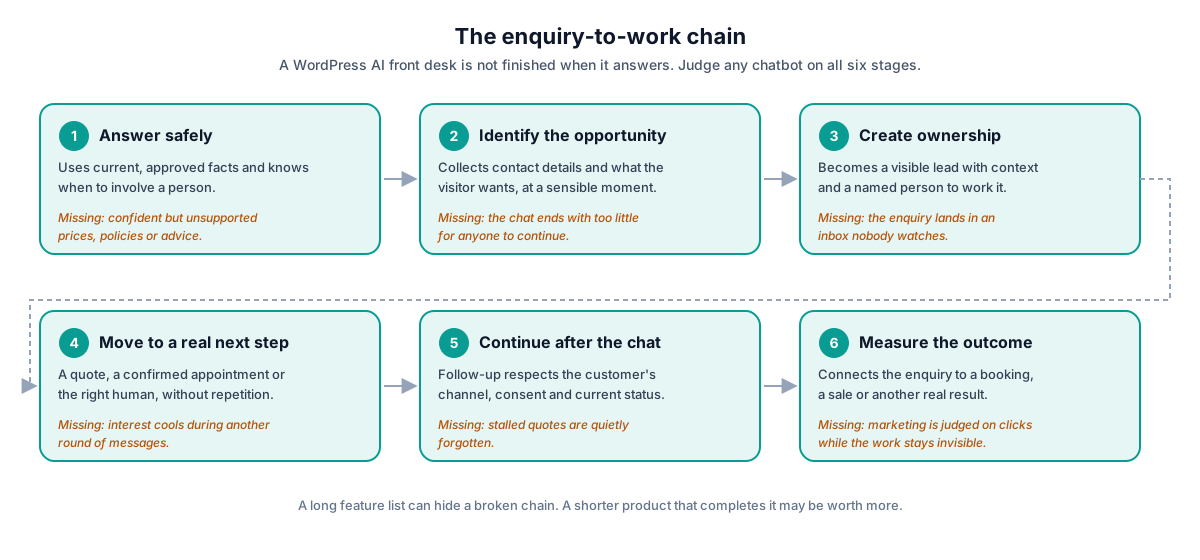
- Answer safely. The assistant uses current, approved information and knows when to involve a person. Without this, the business ships confident but unsupported prices, policies or advice.
- Identify the opportunity. The system collects contact details and what the visitor actually wants, at a sensible moment. Without this, the chat ends with too little for anyone to continue.
- Create ownership. The conversation becomes a visible lead with context and a named person to work it. Without this, the enquiry lands in an inbox nobody watches.
- Move to a real next step. The visitor can request a quote, confirm an appointment or reach the right human without repeating themselves. Without this, interest cools during another round of messages.
- Continue after the chat. Follow-up respects the customer's channel, consent and current status. Without this, stalled quotes are quietly forgotten.
- Measure the outcome. The business can connect the enquiry to a booking, a sale or another real result. Without this, marketing is judged on clicks while the work stays invisible.
This chain is also where most implementations fail, and the failure is rarely the language model. Nobody owns the shared inbox. Old prices sit in the knowledge base. A booking link opens and the visitor still has to repeat everything. Follow-up keeps arriving after the person has already booked. The technology demonstrates beautifully and becomes a neglected browser tab a fortnight later.
How Inboxxit works on a WordPress site
Inboxxit separates the visible WordPress widget from the front-desk workflow behind it. There are four moving parts.
1. Connect the website
The widget is added through the supplied WordPress plugin or a one-line embed script. Either way it loads the hosted Inboxxit chat experience; the assistant settings, leads, inbox and pipeline live in Inboxxit, not in your WordPress database. WordPress's own plugin guidance distinguishes directory installation, uploading a ZIP and manual installation. Inboxxit's plugin is supplied as a ZIP download from your account rather than listed on WordPress.org, so upload-and-activate is the accurate instruction today.
2. Give the assistant approved business information
The entry Website Chatbot plan answers from business facts you supply: contact details, opening hours, service areas, catalogue prices and written responses you have approved. Keyword-triggered rules handle the cases where a particular instruction must take priority. The assistant can reply in English or Spanish, and can be set to detect the visitor's language automatically.
Inboxxit is configured to work from that information rather than invent a price or a policy, and to hand over when confidence is too low. The responsible claim is not that an AI system cannot be wrong. It is that the workflow is designed to limit unsupported answers and make uncertainty visible — and Inboxxit's own terms state plainly that AI outputs are provided without warranty and are not a substitute for human judgment.
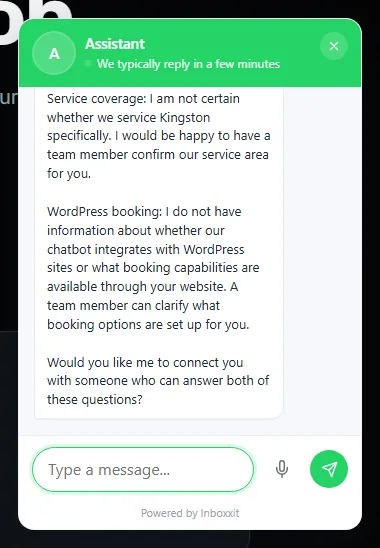
3. Turn the conversation into a lead the team can see
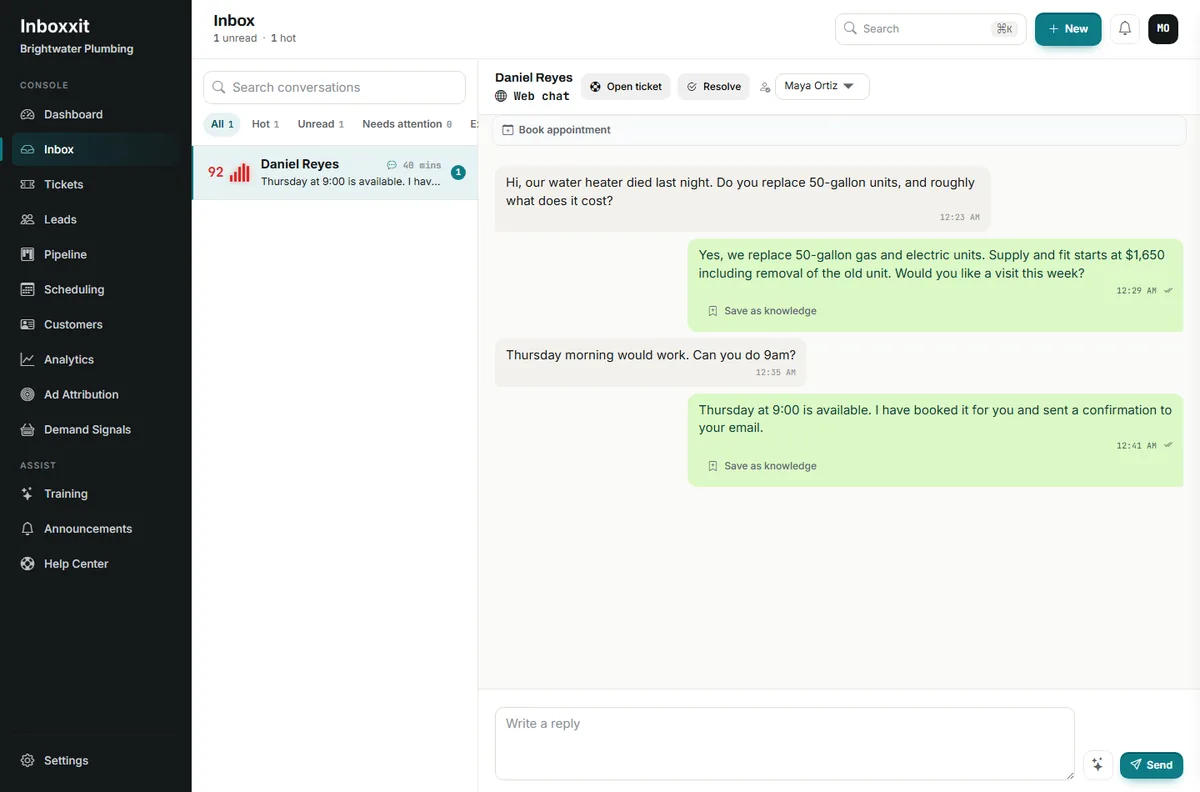
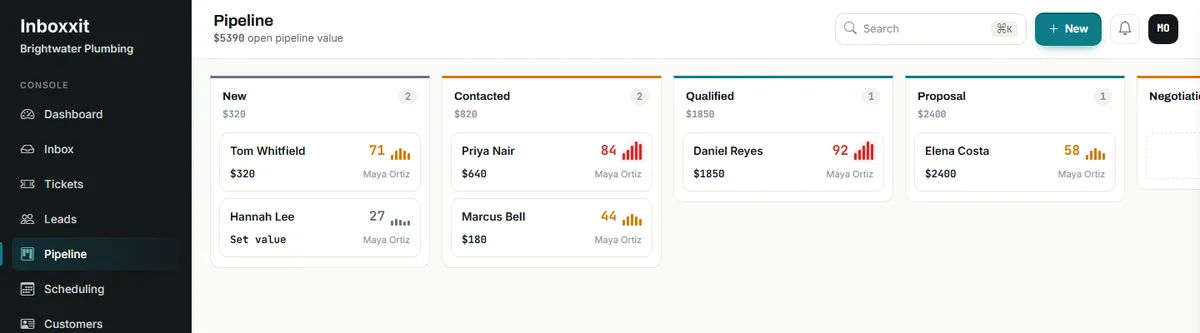
When a visitor gives enough information, Inboxxit creates a lead with the conversation attached, records the service or product of interest, and calculates a buying-intent score from 0 to 100. The lead sits in a shared inbox and sales pipeline instead of becoming an email subject line with no context.
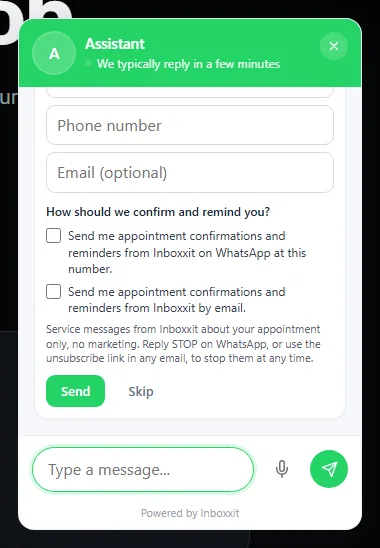
Contact details are requested inside the conversation with separate, unticked consent boxes for confirmations and reminders by WhatsApp or email. Scoring does not replace judgment; it helps a small team decide which conversations to open first.
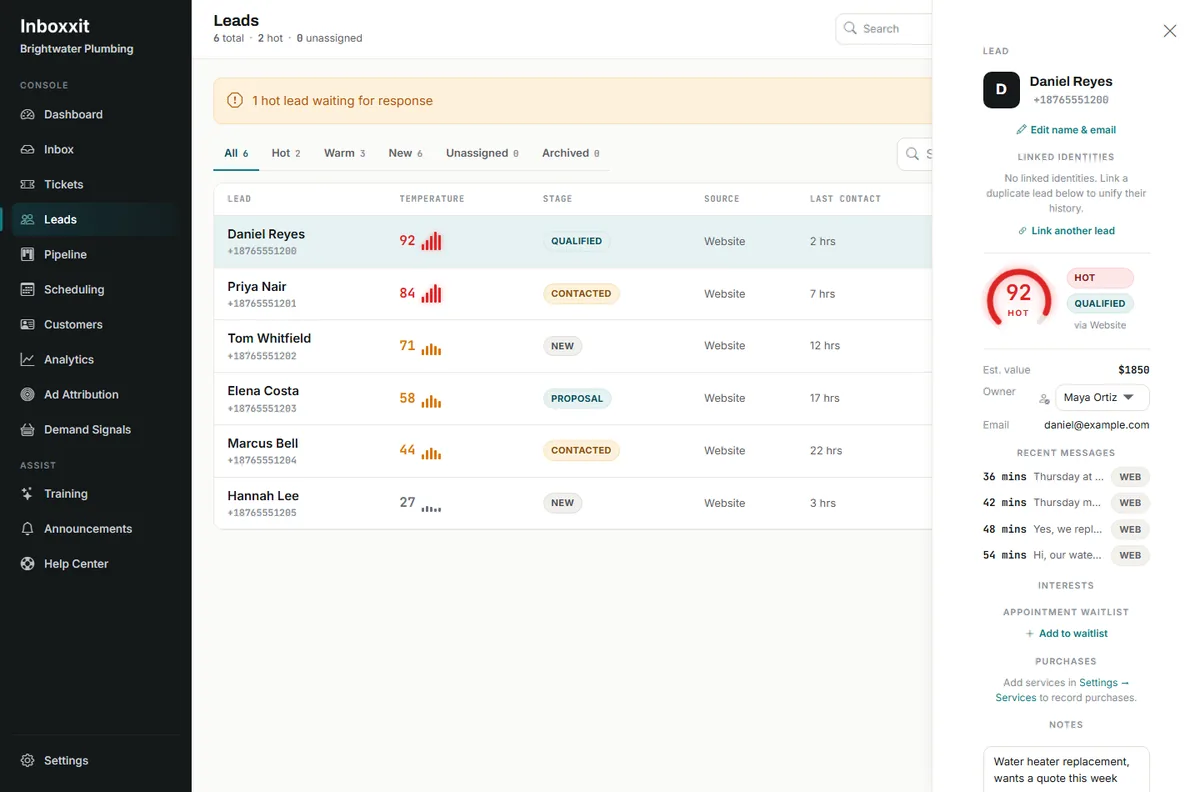
4. Let a person take over
A quote, a sensitive question, an unusual request or a frustrated customer needs a human. The assistant should make that transition easier, not pretend the team is unnecessary. The person taking over should see what was already asked, what was captured and why the conversation was escalated — nobody enjoys explaining the same problem twice because the bot and the staff live in separate systems.
The plugin is the doorbell, not the office
Installing the widget is the short part. Building a dependable front desk is operational work, and it is the part that decides whether the project survives its first month.
Before launch, work through these decisions:
- Choose the job. Decide whether the first priority is answering common questions, capturing quote requests, booking appointments or qualifying enquiries. Automating everything at once makes the first version much harder to test.
- Approve the facts. Review hours, service areas, prices, booking rules, cancellation policies, urgent instructions and anything the assistant must never say.
- Set the boundaries. Identify the questions that should always reach a person — medical, legal, financial, emergency and complex technical matters in particular.
- Design the handoff. Decide who watches new leads, how quickly the team should respond and what happens outside working hours.
- Configure the next step. On Growth and above, connect the calendar and define real booking rules. On the entry plan, make the quote or callback process explicit instead.
- Test the awkward cases. Use real customer wording, vague questions, spelling mistakes, out-of-area requests, old prices and situations where the correct answer is "a person needs to confirm that".
- Review what the assistant could not answer. Treat knowledge gaps as a maintenance queue rather than letting staff solve the same missing answer over and over.
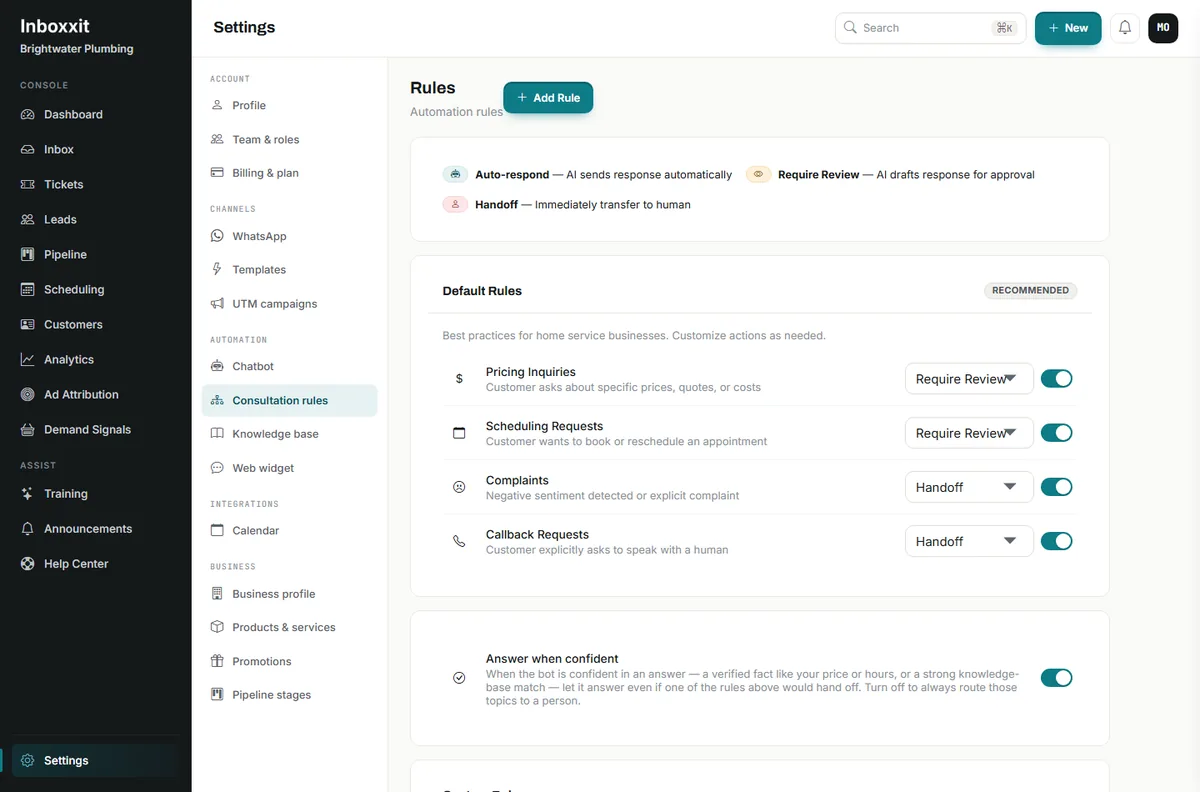
Steps three and four are settings, not philosophy. Inboxxit ships default rules for the four situations that most often need a human, each with its own action, plus a switch that lets a confident, verified answer through anyway.
Step seven has a settings screen too, and it is worth understanding precisely because vendors describe "training" very loosely. When Inboxxit's assistant cannot answer a question, that question is captured and clustered with near-identical ones. An owner or admin can then write the answer and approve it, which turns it into a high-priority verified fact the assistant uses next time.
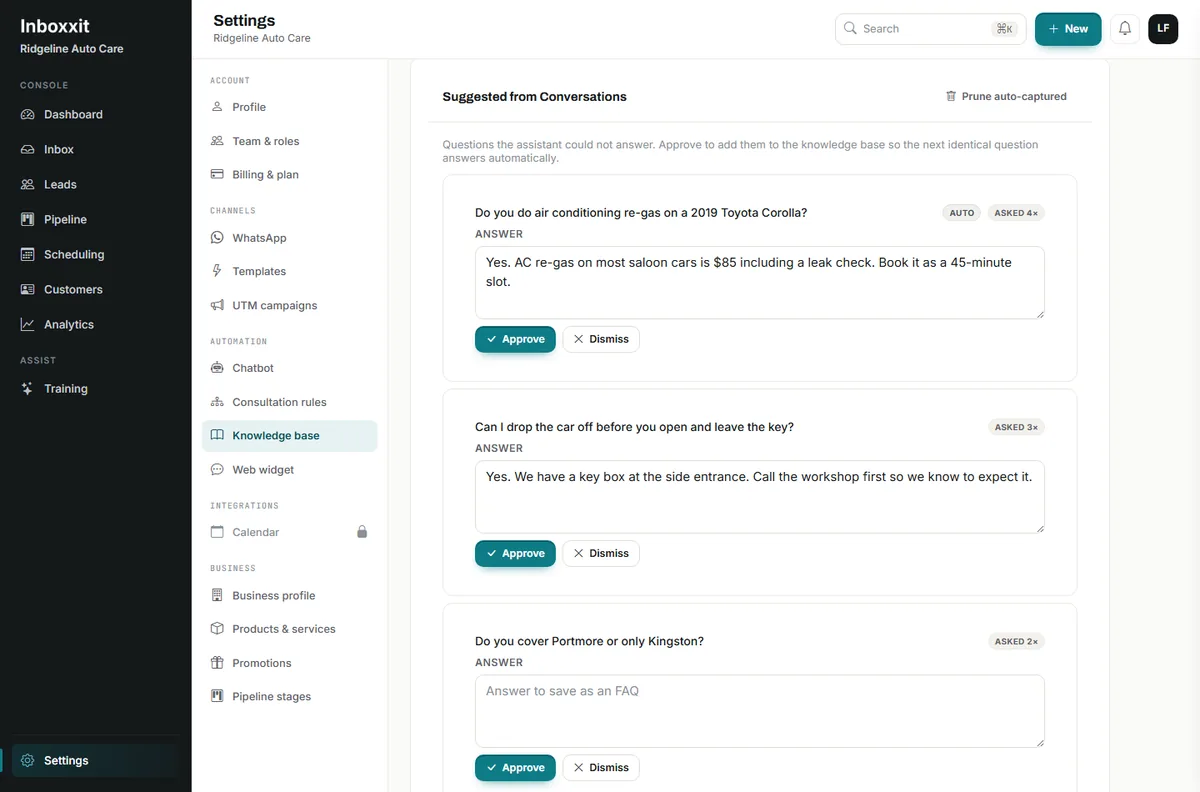
The first version does not need to know everything. It needs to know the common facts, capture genuine opportunities and fail safely.
Plugin, script or tag manager: which installation path?
All three routes place the same hosted front desk on the site. The right choice depends on who maintains WordPress and how the site is governed.
| Installation path | Usually suits | Practical consideration |
|---|---|---|
| WordPress plugin | Owners and agencies that want activation and connection controls inside WordPress | Supplied as a ZIP from your Inboxxit account rather than the WordPress.org directory, so confirm your supported WordPress and PHP versions and agree who applies updates |
| Embed script | Sites where the team already manages approved scripts in the theme or through a code-injection tool | A single asynchronous script tag. Document who owns it, where it loads and how it will be paused or removed |
| Tag manager | Marketing teams that add all third-party tags through a container | Uses a custom-HTML tag with a guard against double injection. Check that your content-security-policy and consent tool allow it |
On page speed, be sceptical of any vendor who answers "no" flatly. Inboxxit's widget is loaded asynchronously, which is the right design, but any third-party script can affect performance depending on your theme, hosting, caching and how many other scripts are already competing. Measure representative pages before and after installation on a staging site rather than accepting a promise of zero impact. None of the three routes removes the need to test mobile display, consent tooling, caching and the human workflow behind the widget.
Choose the plan by the work you need completed
Prices are in US dollars and were verified against the configuration running the live product on 8 September 2026. Confirm the current offer on the pricing page before buying.
| Plan | Best fit | Price | Allowances | Channel |
|---|---|---|---|---|
| Website Chatbot | A service business that needs website answers, lead capture and a shared CRM path | $39/month founder rate, list $59 | 500 conversations, 1,000 AI replies, 3 team members | Website only |
| Growth | A business that needs booking, voice notes, document training, follow-up or advertising conversion reporting | $79/month launch price, list $99 | 3,000 conversations, 4,000 AI replies, 5 team members | Website, plus WhatsApp when available |
| Professional | Higher volume, plus API access and advanced analytics | $149/month launch price, list $199 | 10,000 conversations, 10,000 AI replies, 15 team members | Website, plus WhatsApp when available |
Every plan is metered. Be careful comparing products on the word "unlimited" without reading what is actually counted.
What the entry plan does and does not include
The $39 founder Website Chatbot plan covers the WordPress website only. It includes the grounded chat widget in English and Spanish, automatic lead capture, buying-intent scoring, the shared inbox and pipeline, service or product interest, three team members with roles, keyword-triggered handoff rules and the knowledge-gap review queue shown above.
That is enough when the immediate problem is website enquiries arriving while the team is busy and vanishing into a form, a missed call or an unmonitored inbox.
It does not include WhatsApp, in-chat booking, voice notes, document uploads, website-content training, automated follow-up or advertising conversion reporting.
Booking, WhatsApp and follow-up on Growth and above
Growth is the relevant plan when the conversation should move further before a person steps in. It adds in-chat booking from real availability, Google and Outlook calendar synchronisation, confirmations, reminders, rescheduling links and a waitlist, document uploads and website-content training, voice notes, automated follow-up and outreach, and booking and won-work conversion reporting for Meta and Google.
Three parts of that list deserve plain wording.
Booking should reflect the business without pretending to manage every resource
For an appointment-led business, "we take bookings" is not enough detail. Check whether the system uses actual availability, respects business hours and closed days, holds a slot while it collects the remaining details, creates the appointment only after confirmation, synchronises with the calendar the team already uses, sends reminders, handles rescheduling and has a sensible path when nothing suitable is open. Inboxxit's booking assistant covers those tasks on Growth and above.
Capacity is worth understanding exactly, because it is commonly misdescribed. Inboxxit's setting is the number of appointments each person takes at once, from 1 to 20. You tick the people who share the work; jobs are spread between them and each person's own connected calendar is checked before their name goes on a visit. With nobody ticked, bookings go to the account owner.
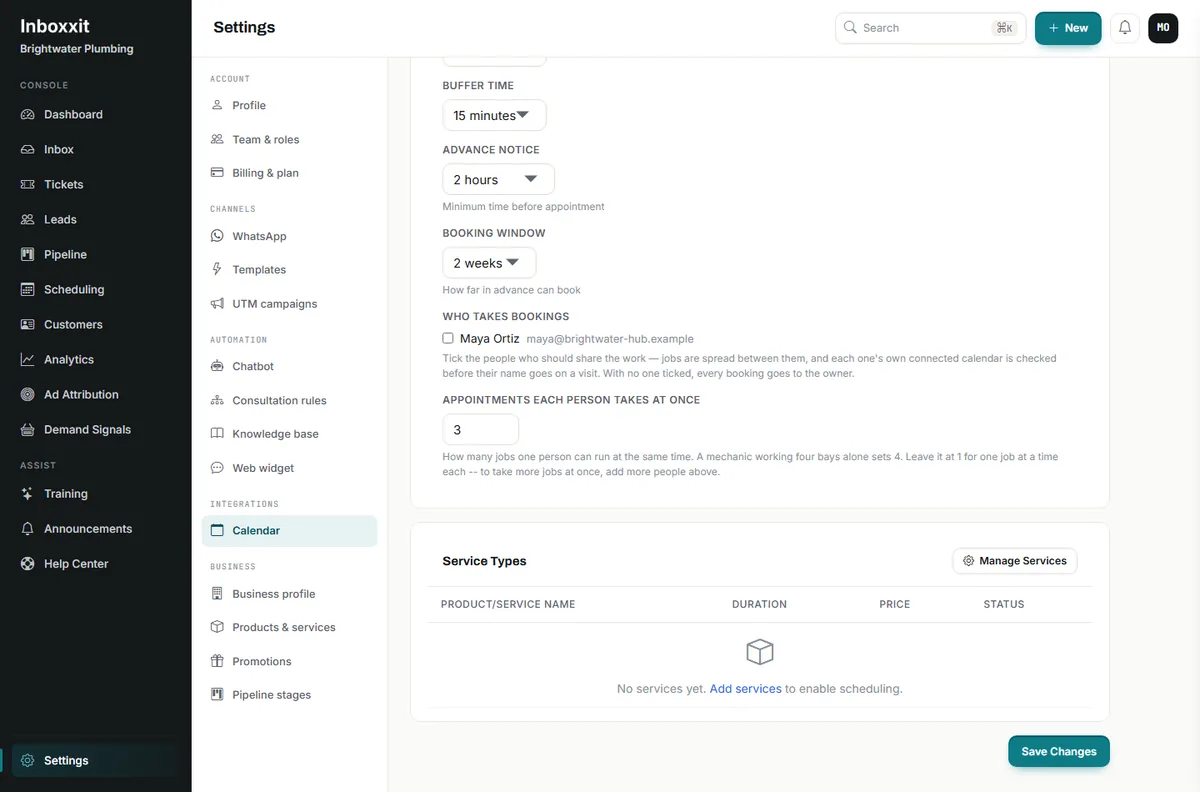
What Inboxxit does not do is model rooms, chairs, bays or equipment as separately bookable resources. If a booking must reserve a specific chair or a particular machine as well as a person, compare specialist scheduling software and confirm how it would connect to the chatbot.
WhatsApp needs your own number and Meta's approval
WhatsApp is built into the Growth tier and above, but it is not on public sale while Meta business verification completes. If WhatsApp is your front door today, confirm timing with us before you buy rather than assuming the plan page covers it.
When it is available, WhatsApp runs on your own business number through the official Meta Cloud API. That is a setup process, not a one-click switch, and Meta's rules shape what you can send: outside a 24-hour customer-service window, free-form replies are not permitted and an approved template is needed to reopen the conversation. Any vendor promising unrestricted WhatsApp messaging is describing something Meta does not allow.
Voice notes are not phone answering
Voice-note support lets customers send and receive audio messages inside the chat workflow, which matters in mobile-first markets where people would rather talk than type. Growth includes 300 voice notes a month and Professional 1,000; the entry plan includes none. It does not mean Inboxxit answers ordinary telephone calls.
Who Inboxxit fits, and who should choose something else
Inboxxit is strongest when the business wins work through conversations and the same small team has to answer, qualify, book and follow up: trades and home services, automotive repair, salons and barbers, studios, classes and tutors, property services, dental and healthcare practices using carefully bounded administrative workflows, professional services with repeatable intake questions, and agencies installing a front desk for service-business clients. It is most relevant when the owner is usually delivering the service rather than sitting at a desk waiting for messages.
Compare a different category of product when:
- the main requirement is WooCommerce product recommendations, cart recovery or order support;
- you want a voice agent to answer ordinary telephone calls;
- a large staffed support operation needs mature ticket routing, workforce management and contact-centre controls;
- you want a do-it-yourself native WordPress bot with your own AI provider and are comfortable running the technical stack;
- staff, room, chair, bay or equipment assignment is essential to the booking;
- you expect a chatbot to give medical, legal or other regulated advice without human review;
- nobody is prepared to maintain the business information or own the resulting leads.
Four of those situations have guides of their own, because the line between what a chatbot may finish and what a person must own sits in a different place in each. Plumbing turns on dispatch and a safety route that runs through the utilities. Pest control turns on a licensed operator being answerable for identification and treatment. Dental practices turn on health data and clinical judgment, and have the strictest limits of the three. And if you are weighing a general support widget against a lead-capture front desk, the Tidio comparison works through that trade-off directly.
Inboxxit has a catalogue that holds product names, prices, stock and availability, but retail remains a secondary use case. A retailer should discuss the intended workflow rather than assume the product has been proven as a WooCommerce sales engine. If you want the vendor-by-vendor view instead, our comparison of WordPress AI chatbots for service businesses reviews five options against these same criteria.
What to test before customers see the chatbot
Do not test only with friendly questions that already match the brochure. Use the situations most likely to expose a weak setup.
Answer control. Ask for a real starting price, and then for an old one. Ask about a service area just inside and just outside your boundary. Ask for a policy you have not supplied. Ask something the assistant should refuse or hand to a person.
Lead ownership. Leave halfway through a conversation and check what the team actually receives. Use the same email or phone number twice and watch how the records behave. Confirm the service of interest and conversation context stay attached. Check who is responsible for the next action and how they are told.
Booking, on Growth and above. Request a time outside business hours. Take the last available slot from two devices at once. Test a closed day, a reschedule, a reminder and the waitlist path. Confirm what simultaneous capacity means for your team before you rely on it.
WordPress and data handling. Test mobile and desktop placement on the pages where the widget will appear. Measure page performance before and after. Review caching, consent, security and content-security-policy behaviour. Understand where messages and contact details are processed, retained, exported and deleted.
Data protection: know which law applies to you
A chat widget collects personal data, so the business running it is the data controller, whatever the software does. In the Caribbean that obligation is increasingly specific rather than theoretical.
- Jamaica. The Data Protection Act, 2020 has been fully enforceable since 1 December 2023 and is overseen by the Office of the Information Commissioner, which registers data controllers and can investigate, audit and penalise.
- Barbados. The Data Protection Act 2019 is in force, with a Data Protection Commissioner.
- The Bahamas. The Data Protection (Privacy of Personal Information) Act has been in force since 2007 and has an established regulator.
- Trinidad and Tobago. The Data Protection Act 2011 has only ever been partially proclaimed, so check the current position rather than assuming the whole Act applies.
Practically, that means deciding before launch what the widget may ask for, how long you keep it, who in your team can see it and how someone requests deletion. It also means keeping certain categories out of the chat entirely: Inboxxit's privacy policy prohibits sending protected health information, government identification numbers, financial credentials, biometric data and information about children under 13 through the platform. A clinic can use a chatbot for opening hours, service information and appointment administration; it should not use one as a place for patients to describe symptoms. Our guide for dental practices works through that boundary against the Data Protection Act in detail. Clinics, schools and regulated professionals should get a qualified privacy review for the information they actually intend to collect, in the territory where they actually operate.
A practical setup for agencies and developers
An agency can install Inboxxit on a client's WordPress site, but the installation should not blur responsibilities. Agree in writing who supplies and approves business facts, who decides which questions must be escalated, who monitors the inbox and pipeline, who maintains prices and hours, who supports the WordPress connection, who reviews knowledge gaps and conversation quality, and which plan and allowances the client is buying.
One client account is a different commercial arrangement from a multi-client operation. Do not assume a standard plan includes white-label branding, sub-accounts, client billing or a service-level agreement. Agencies managing several businesses should look at the separate Agency licence, which covers ten managed client accounts under one subscription at $249 per month.
Price the whole front desk, then decide
The subscription is one part of the decision. Also count the conversations and AI replies included, the number of team members, website-only versus website-and-WhatsApp coverage, any Meta charges that sit outside the software plan, who prepares and maintains the knowledge, who watches escalations and follows up, whether booking and calendar work are included, whether you need advertising conversion reporting, and how leads and conversation data can be exported if you leave.
Inboxxit has no free trial. Payment is collected at signup and a new customer can request a full refund within 30 days of the first payment under the 30-day money-back guarantee. The founder rate of $39 per month on the entry plan is scheduled to close on 31 October 2026 and is held for the life of the subscription while it stays active; confirm the current offer on the pricing page before you buy.
Choose a knowledge bot when the job genuinely ends with answering common questions. Choose a live-support platform when staff-led conversation is the centre of the operation. Choose a WooCommerce assistant when product discovery and cart activity are the real priorities. Choose a voice receptionist when missed telephone calls are the problem.
Choose Inboxxit when the WordPress conversation needs to become an owned service lead: answered from approved information, captured with useful context, prioritised in a shared pipeline and moved towards the right next step. Start on the Website Chatbot plan when web coverage, lead capture and CRM visibility solve the immediate problem; choose Growth when booking, voice notes, follow-up or advertising conversion reporting are part of the workflow.
If your workflow involves calendar rules, WhatsApp setup or regulated information, talk to us first and verify those details before signing up.
How we checked
Inboxxit plan prices, allowances, feature gates, booking capacity behaviour, language options, voice-note limits and the founder deadline were verified on 8 September 2026 against the configuration that runs the live product, not against a marketing page. Every product screenshot in this article was captured from Inboxxit in September 2026; the two diagrams are ours. Where the live site and the verified configuration disagree, we have followed the configuration and said so.
- Inboxxit pricing, the Website Chatbot plan, the booking assistant and the WordPress integration guide
- Inboxxit privacy policy and terms of service, for the prohibited data categories and the AI-output disclaimer
- WordPress plugin management documentation
- Meta WhatsApp Cloud API messaging guidance, for the 24-hour customer-service window
- Jamaica Data Protection Act, 2020 and the Office of the Information Commissioner
The enquiry-to-work chain
Six stages to judge any WordPress AI chatbot on, in the order an enquiry passes through them.
-
Answer safely
Use current, approved information and know when to involve a person.
-
Identify the opportunity
Collect contact details and what the visitor wants, at a sensible moment.
-
Create ownership
Turn the conversation into a visible lead with a named person to work it.
-
Move to a real next step
A quote, a confirmed appointment or the right human, without repetition.
-
Continue after the chat
Follow up respecting the customer's channel, consent and current status.
-
Measure the outcome
Connect the enquiry to a booking, a sale or another real result.
Frequently Asked Questions
Will an AI chatbot slow down my WordPress site?
Any third-party plugin or script can affect performance depending on the theme, hosting, caching and implementation. Inboxxit's widget loads asynchronously, but the responsible approach is to measure representative pages before and after installation on a staging site rather than promising zero impact.
Can Inboxxit give customers a quote?
It can answer from prices and rules the business has approved, and capture the details needed for a quote. By default, pricing enquiries are set to draft a reply for a human to approve. Custom or uncertain pricing should go to a person unless you have deliberately configured a safe, repeatable response.
Does Inboxxit replace a CRM?
Inboxxit includes a shared inbox, lead records with buying-intent scores and a sales pipeline, so a small service business may not need a separate CRM for this workflow. A team with an established CRM should confirm the integration or data-transfer process before changing systems.
Can a clinic or professional practice use a WordPress AI chatbot?
Yes, for carefully defined tasks such as opening hours, service information, appointment administration and lead capture. Inboxxit's privacy policy prohibits sending protected health information, government identification numbers, financial credentials or biometric data through the platform, so the practice must decide what the bot may collect and which questions require a professional. In Jamaica the Data Protection Act 2020 applies and is enforced by the Office of the Information Commissioner; other Caribbean territories have their own regimes. Get a qualified privacy review for your jurisdiction.
Is WhatsApp included with the $39 WordPress chatbot plan?
No. The $39 founder Website Chatbot plan covers the website only. In-chat booking, voice notes, document training, automated follow-up and advertising conversion reporting begin on Growth at $79 per month. WhatsApp is built into Growth and above but is not on public sale while Meta business verification completes, so confirm timing with Inboxxit before buying for WhatsApp.


